
A business website can have plenty of content and still miss important questions from potential customers.
The problem is often not a lack of ideas.
It is a lack of evidence about which ideas deserve attention.
Google Search Console can help because it shows how your website performs in Google Search, including the queries that show your pages, the pages receiving visibility, impressions, clicks, CTR, and average position.
For a business, the useful part is not simply knowing which page received the most clicks.
The more useful question is:
What does the search data reveal about what people are trying to understand?
Start With What Your Website Already Has
Your website has history.
Pages have already appeared for searches. Some have earned clicks. Some have received impressions without much traffic. Some may be showing up for topics that were never part of your original content plan.
That history is useful.
Imagine a home remodeling company publishes an article about kitchen renovation costs.
Later, Search Console shows impressions for:
- kitchen remodeling timeline
- kitchen remodeling mistakes
- kitchen remodel checklist
- cabinet refacing vs replacement
- small kitchen renovation ideas
Those searches can reveal opportunities around the broader customer journey.
The business may need to:
- Improve the existing article
- Add a new section
- Create a supporting guide
- Create a comparison
- Build a new service-focused page
The query is the signal.
The content decision comes afterward.
Four Possible Actions
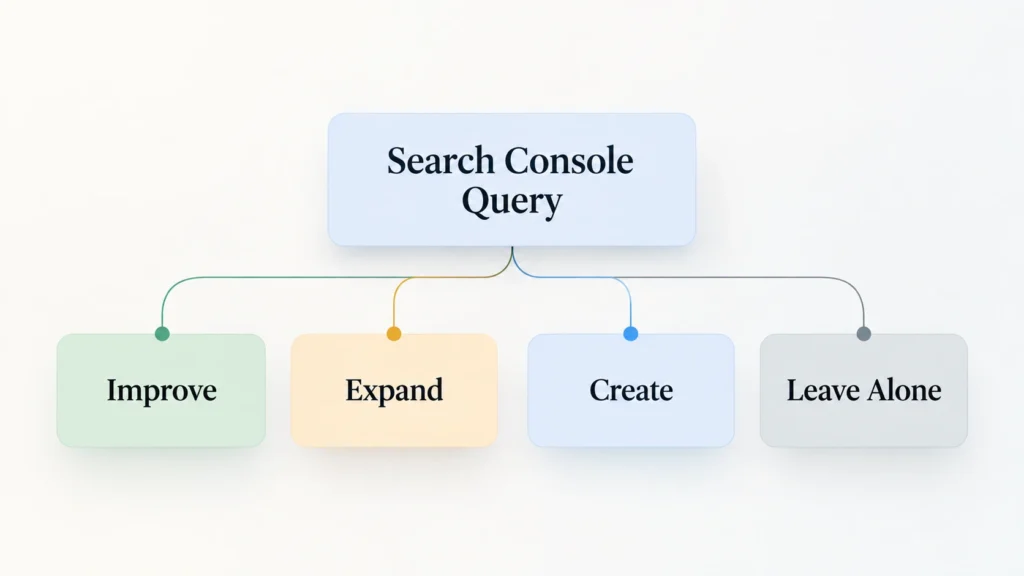
When reviewing Search Console, avoid turning every query directly into an article title.
Instead, classify the opportunity.
Improve
The existing page is relevant but does not fully answer the question.
Expand
The topic belongs on the current page, but the explanation is too shallow.
Create
The query represents a meaningful question that deserves a dedicated resource.
Leave It Alone
The query may not be relevant enough, substantial enough, or commercially useful enough to justify additional work.
That last option matters.
Not every search impression deserves a content project.
Why Impressions Matter
A click tells you that someone visited.
An impression tells you that your website appeared.
Google’s documentation explains that impressions measure how often your site appeared in Search, while clicks measure how often users clicked through.
For content discovery, impressions can therefore be an early signal.
You may find a query that is generating visibility but almost no traffic.
That does not automatically mean the topic is bad.
Google specifically points to high-impression, low-CTR queries as areas worth investigating for title, description, and content improvements.
The important part is investigation.
Search Intent Should Decide What Happens Next
Consider these three searches:
website redesign
website redesign checklist
should I redesign or rebuild my website
They are related.
But they are not the same question.
The first is broad.
The second is preparation-focused.
The third is a decision.
If your existing page is ranking for all three, that does not necessarily mean you need three articles.
You need to understand the intent behind each search.
That is why Search Console data should be interpreted rather than copied into a content calendar.
Check Which Page Is Actually Appearing
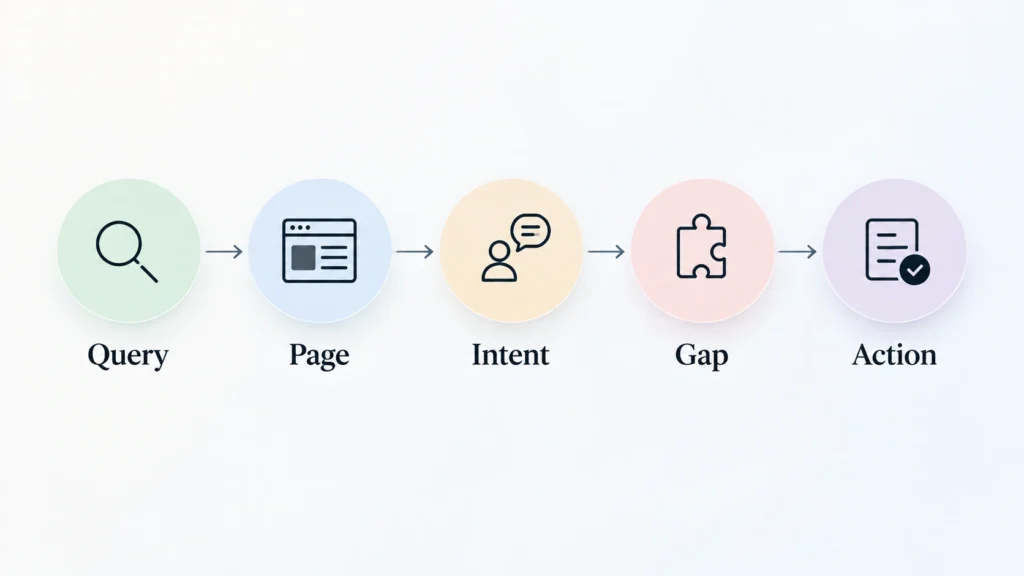
Google Search Console allows you to select a query and then see which pages were shown for that query.
This creates a practical review process:
Query → Page → Intent → Gap → Action
Suppose the query is:
“WordPress maintenance checklist”
The page appearing is a general WordPress maintenance article.
Read the article.
If it already contains a detailed checklist, the opportunity may be limited.
If it only mentions maintenance tasks briefly, improving the existing article may be enough.
If the checklist deserves a complete resource, a separate article may make sense.
This is a much better approach than creating content simply because a phrase appears in Search Console.
Look for Unexpected Queries
The expected queries are useful.
The unexpected ones can be even more interesting.
A website redesign company might discover that its pages are appearing for searches about:
- website trust
- conversion problems
- confusing navigation
- poor mobile experience
- unclear calls to action
Those searches may reveal that visitors are not only thinking about design.
They are thinking about business performance.
That can influence future content, service positioning, website structure, and internal linking.
Search Console Can Reveal Topic Clusters
One query is a clue.
Several related queries can become a pattern.
Imagine a business sees repeated searches around website speed:
- website speed test
- slow website causes
- improve website loading speed
- mobile website speed
- Core Web Vitals
Before creating five articles, group them.
Then ask whether the audience needs:
- One comprehensive guide
- A main guide plus supporting articles
- A technical guide
- A service page
- Several focused resources
This keeps the website organized and reduces unnecessary content overlap.
Content Opportunities Can Be Commercial Too
Not every useful search should lead to a blog article.
Suppose a business offers WordPress maintenance and discovers searches around:
“WordPress maintenance service for small business”
That may be a stronger service-page opportunity than a blog topic.
The question is:
What type of page would best satisfy this searcher?
That could be an article.
It could also be a service page, comparison, checklist, resource, or FAQ.
Content strategy should follow the customer’s need.
Use Insights as the Starting Point, Then Go Deeper
Search Console’s Insights report provides a simpler overview of performance, including top and trending content and queries. Google says these insights can help identify opportunities for new or improved content.
For a business owner who does not want to spend hours inside spreadsheets, this can be a useful starting point.
Look for:
- Content trending up
- Queries trending up
- New search themes
- Pages attracting unexpected queries
- Content generating meaningful clicks
Then use the Performance report to investigate the details.
A Practical Monthly Review
You can turn this into a repeatable process.
1. Review important pages
Start with your main service pages and strongest content.
2. Review queries
Look for relevant searches, especially unexpected ones.
3. Group similar searches
Think in terms of questions and topics rather than individual keywords.
4. Check the associated page
Read the page from the searcher’s perspective.
5. Identify the gap
Is the answer missing, unclear, outdated, or too shallow?
6. Choose the content action
Improve, expand, create, or leave alone.
7. Validate the topic
Search manually and understand what type of content the results suggest.
This process keeps content planning connected to actual website behavior.
Do Not Let Search Data Become a Publishing Machine
There is a temptation to see hundreds of queries and immediately create hundreds of pages.
That is usually the wrong direction.
Google’s current guidance emphasizes creating helpful, reliable, people-first content rather than content produced primarily to manipulate rankings.
The purpose of Search Console should therefore be understanding.
Not volume.
You are looking for questions worth answering.
You are not trying to manufacture a page for every possible variation of a search.
The Practical Takeaway
Search Console can help businesses discover content opportunities because it provides information about how their existing website participates in Google Search.
That makes it particularly useful for finding:
- Missing questions
- Weak explanations
- Unexpected topics
- Content clusters
- Service opportunities
- Pages that need improvement
But the tool does not decide what your business should publish.
Your audience, offer, expertise, and business goals still matter.
If you are reviewing Search Console for the first time, start with a handful of important pages. Look at the queries connected to them, group similar searches, inspect the actual pages, and decide what action makes sense.
The goal is not more content.
The goal is a website that answers more of the right questions.