
You can now describe a website to Claude and get something that looks surprisingly close to a finished concept. Pages can be outlined, layouts can be explored, copy can be drafted, and even interactive website prototypes can be produced without starting from a blank screen.
That changes the website planning process, but it does not eliminate the need for planning.
For a service business, a website is not simply a collection of attractive pages. It has to explain what the business does, help the right people understand whether the service fits their needs, establish trust, answer practical questions, and create a clear path toward contacting, booking, requesting a quote, or taking another relevant action.
That is where the difference between AI-assisted planning and traditional website planning becomes important.
Claude can help you explore ideas faster. Traditional planning methods help make sure those ideas are connected to the actual business, customer, content, and technical requirements.
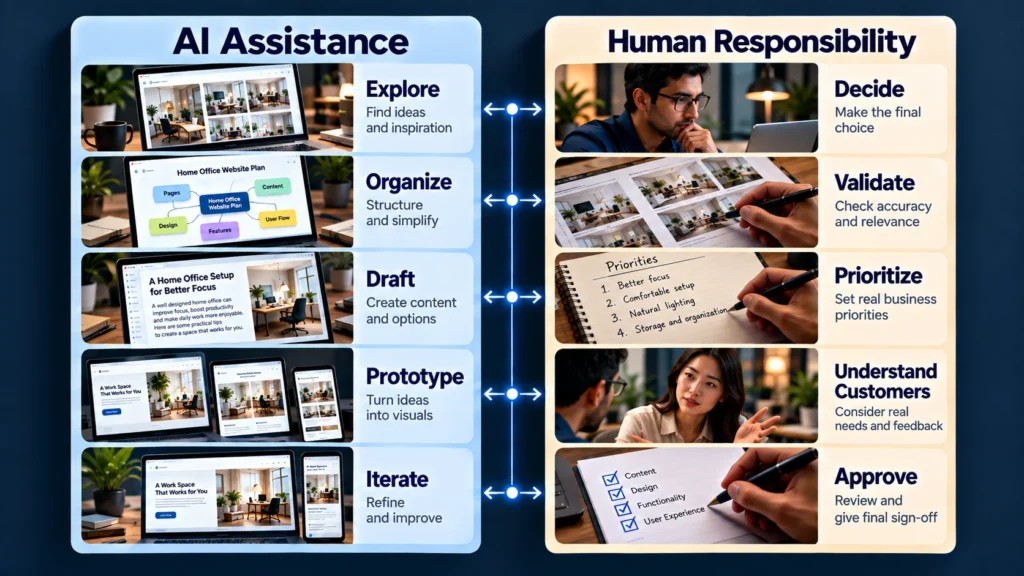
The strongest approach is often not choosing one over the other. It is knowing which parts should be accelerated with AI and which parts still require deliberate human decision-making.
What Traditional Website Planning Actually Involves
When people hear “traditional website planning,” they sometimes imagine a designer opening Figma and drawing boxes on a page.
That is only one part of it.
A proper website planning process usually begins much earlier. Someone needs to understand the business, its services, its customers, its goals, the information people need before contacting the business, the pages required, the relationships between those pages, and the actions the website should encourage.
For a service business, that might mean answering questions such as:
- What are the primary services?
- Which services deserve their own pages?
- Who is each service for?
- What locations does the business serve?
- What questions do prospects usually ask?
- What proof or trust signals should appear?
- Should visitors call, book, request a quote, or submit an inquiry?
- What happens after a form is submitted?
- Which pages matter most for search visibility?
- What content needs to be supplied by the business?
- What technical or accessibility requirements need to be considered?
The output may eventually include a sitemap, content structure, user journeys, wireframes, page requirements, design direction, and development specifications.
The important part is that these decisions are connected.
A homepage is not planned in isolation from the service pages. A booking page is not planned independently from the customer journey. A location page is not just another URL. Its usefulness depends on the actual service area, content, and search intent behind it.
W3C’s accessibility planning guidance similarly emphasizes defining goals, responsibilities, resources, review processes, and stakeholder involvement rather than treating accessibility as something added at the end.
That broader planning mindset is useful even when accessibility is not the main focus of the project.
Where Claude Changes the Process
Claude makes some parts of this work much faster.
Anthropic’s current Claude capabilities include Projects, where users can provide documents, code, and other context along with project instructions. Claude also supports Artifacts that can produce and iterate on documents, diagrams, websites, and interactive components.
Anthropic has also introduced Claude Design, which can turn prompts, uploaded materials, and existing design context into visual concepts and prototypes that can be refined conversationally.
For website planning, that creates several useful possibilities.
You can give Claude:
- Existing website content
- Service descriptions
- Brand guidelines
- Competitor examples
- Customer questions
- Existing page structures
- Design references
- Business requirements
- Draft copy
- Notes from a discovery call
Then ask it to organize that information into potential page structures, content outlines, user journeys, wireframe concepts, or design directions.
That is valuable because exploration is no longer as expensive as it used to be.
You can test more directions before committing to one.
But there is an important distinction:
Claude can help generate possibilities. It cannot automatically know which possibility is right for the business.
The Real Advantage of AI Is Exploration
Suppose you are planning a website for a roofing company.
A traditional process might establish the core structure first:
Home → Roofing Services → Individual Service Pages → Service Areas → About → Reviews → Contact
Claude can then help explore what each page might contain.
It could suggest different ways to structure the roofing service page. It could generate alternative hero sections. It could organize frequently asked questions. It could turn a rough service description into a clearer content hierarchy. It could even create a visual prototype for discussion.
That can save time.
But Claude does not automatically know whether the roofing company actually wants emergency roofing leads, insurance-related inquiries, commercial projects, residential replacements, or some combination of these.
That decision comes from the business.
The AI can organize the information you give it. It should not silently invent the business strategy.
Where AI Planning Can Go Wrong
The biggest risk is not that Claude cannot produce a website concept.
The bigger risk is that it can produce one too easily.
A polished prototype can create the impression that the planning is finished when the important questions have not been answered.
You can end up with:
- Beautiful but generic service pages
- A sitemap based on assumptions
- Repetitive location pages
- Calls to action that do not match the business process
- Missing information customers actually need
- Incorrect service descriptions
- Overly broad navigation
- Content written before the messaging is clear
- Design decisions made before requirements are understood
This is especially important for service businesses because their websites often depend on details that are not visible from the surface.
A plumbing company may need emergency calls handled differently from standard quote requests. A law firm may need different intake paths for different case types. A med spa may need treatment information, consultation booking, location details, and carefully structured trust content. A consultant may need a completely different journey based on whether the goal is a discovery call, an application, or direct purchase.
AI can help model these scenarios.
It cannot decide the business rules without reliable input.
What Should Stay Human?
A useful way to think about website planning is to divide decisions into two categories.
| Planning area | AI can help with | Human judgment still matters |
| Sitemap | Generate possible structures | Decide what the business actually needs |
| Page content | Organize and draft | Verify accuracy and positioning |
| User journeys | Explore possible paths | Confirm how real customers behave |
| Wireframes | Generate concepts | Select what supports the real goal |
| Visual direction | Explore alternatives | Protect brand identity and usability |
| FAQs | Organize likely questions | Confirm answers are accurate |
| SEO structure | Suggest topic relationships | Validate search intent and business relevance |
| Requirements | Turn notes into a checklist | Identify missing requirements |
| Prototypes | Build quickly | Test whether the concept actually works |
| Final decisions | Compare options | Take responsibility for the outcome |
The distinction is simple.
AI can reduce the cost of exploration. Human planning still determines the direction.
A Better Workflow for Service Business Websites
Instead of asking whether Claude or traditional planning should be used, consider combining them deliberately.
1. Start with business discovery
Before asking Claude to design anything, establish the basics.
Document:
- Business goals
- Primary services
- Target customers
- Service areas
- Main conversion actions
- Customer concerns
- Differentiators
- Trust signals
- Existing content
- Technical requirements
- Integrations
- Constraints
This becomes the source material for everything that follows.
2. Give Claude real context
This is where tools such as Claude Projects can become useful.
Instead of asking:
“Create a website for a dental clinic.”
Provide the actual business information, existing content, brand guidelines, service details, customer questions, and other relevant material.
Claude’s Projects feature allows uploaded documents and project instructions to provide ongoing context across chats within a project.
The quality of the output depends heavily on the quality of the context.
3. Use AI to explore options
Now let Claude generate alternatives.
Ask it to explore:
- Two or three sitemap structures
- Different homepage approaches
- Service page hierarchies
- Customer journeys
- CTA strategies
- Wireframe directions
- Content structures
- FAQ groupings
This is where AI can be genuinely useful.
You are not asking it to make the final decision. You are asking it to widen the range of possibilities before you decide.
4. Review the options against the business
This is the step that should not be skipped.
Take each proposed direction and ask:
Does this reflect how the business actually operates?
Does the navigation make sense?
Does the customer journey match the way leads are handled?
Are important services represented correctly?
Does the content answer real customer questions?
Does the design support the intended action?
Does the structure make sense for search and accessibility?
W3C recommends involving users early and throughout web projects because real user input can reveal problems that teams might otherwise miss.
AI-generated planning should be treated in the same way: as something to evaluate, not something to accept automatically.
5. Turn the selected direction into a real specification
Once the direction is clear, document it.
That might include:
- Final sitemap
- Page-by-page requirements
- Content requirements
- Design direction
- Component requirements
- Forms and integrations
- SEO requirements
- Accessibility considerations
- Responsive behavior
- Technical dependencies
- Approval checkpoints
At this stage, you are moving from exploration into execution.
6. Prototype before development when useful
This is another area where Claude can shorten the feedback loop.
Anthropic’s Artifacts can generate websites, diagrams, and interactive components that can be reviewed and iterated before a full implementation.
That makes prototypes useful for questions such as:
“Does this homepage hierarchy make sense?”
“Is this service comparison clear?”
“Does the booking flow feel too complicated?”
“Is this section answering the customer’s concern?”
Those are much cheaper questions to answer before development than after a website has already been built.
AI Should Not Become the Strategy
There is a temptation to start with Claude because it feels productive.
You type a prompt. A sitemap appears. Then a homepage appears. Then a full visual concept appears.
You are moving quickly, but you may not actually be moving in the right direction.
The better approach is to treat AI as an accelerator inside a larger strategy.
For example:
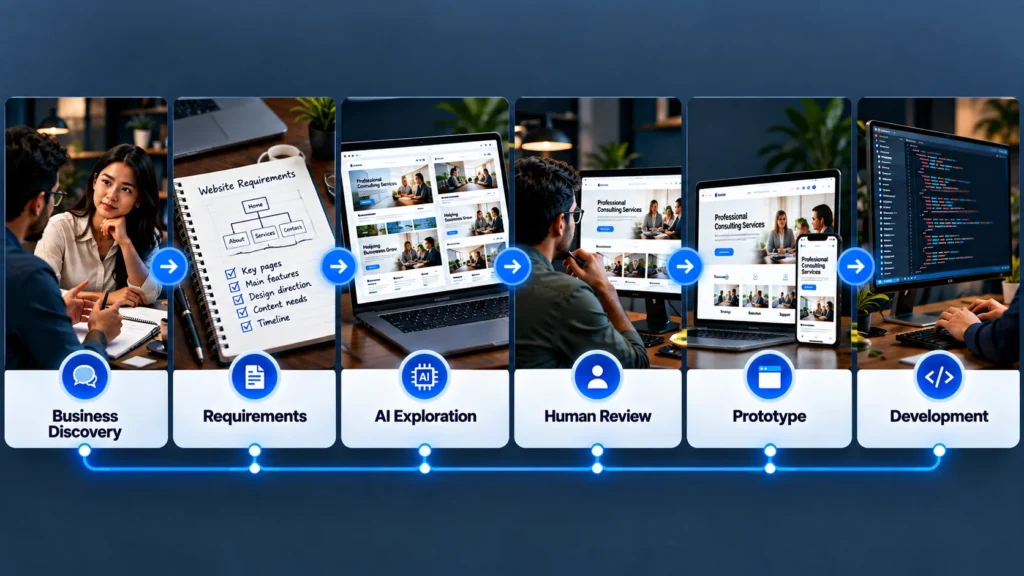
Business understanding → Requirements → AI exploration → Human review → Selected direction → Prototype → Testing → Development
That sequence gives AI a useful role without handing over the strategic decision.
The same principle applies to content.
Google’s current Search guidance emphasizes useful, reliable, people-first content and warns against using automation primarily to produce large amounts of content without adding value.
The lesson extends beyond SEO.
If the website itself is built around generic AI output, it may look polished while saying very little that is specific to the business.
So, Which Approach Fits a Service Business?
The answer depends on what you mean by “planning.”
If you are deciding between AI-generated ideas and no planning at all, AI-assisted exploration is clearly more useful than starting blindly.
But if you are deciding between AI doing the planning for you and a structured planning process supported by AI, the second model is fundamentally different.
A service business still needs someone to understand its customers, services, operations, priorities, content, and conversion path.
Claude can help that person work faster.
It can help turn notes into structures, explore alternatives, create prototypes, identify missing information, and make early ideas easier to see and discuss. Anthropic’s current tools are increasingly capable of this kind of collaborative design and knowledge work.
But the business should still own the decisions.
A More Practical Role for Claude in Website Projects
If I were structuring an AI-assisted website planning process for a service business, I would use Claude heavily during exploration, organization, prototyping, and refinement, while keeping business strategy, requirements approval, customer understanding, final content accuracy, and implementation decisions under deliberate human review.
That division gives you the speed of AI without confusing speed with strategy.
A good website is not created simply because someone can generate a page quickly. It becomes useful when the pages, content, navigation, design, technology, and customer journey all make sense together.
The Practical Takeaway
Claude does not have to replace traditional website planning to be valuable.
Its real strength is that it can make parts of the planning process faster and more visible. You can explore more ideas, turn rough requirements into something tangible, prototype different directions, and identify gaps before development begins.
For a service business, that can be a meaningful improvement.
But the closer a decision gets to the actual business, customer, brand, operations, or long-term website strategy, the more important human judgment becomes. Use Claude to expand the thinking, not to avoid thinking.
If you are planning a website with AI and already have a few concepts but are unsure which direction actually supports the business, reviewing the requirements and customer journey before development can prevent a polished prototype from becoming an expensive wrong turn.