

A service business can lose a customer without realizing it happened.
Sometimes the reason is not pricing, competition, or a poor website. Sometimes the customer simply sent a message that never received the attention it needed.
The email arrived. Nobody intentionally ignored it. It just got buried.
That is why email organization deserves more attention from small businesses. Your inbox is part of the operational system behind your customer experience.
The real problem is not email volume
Many business owners assume they need to reduce the number of emails they receive.
That can help, but it does not solve the entire problem.
The bigger issue is signal versus noise.
A service-business inbox may contain customer inquiries alongside:
- Marketing newsletters
- Software notifications
- Receipts
- Team communication
- Vendor messages
- Automated website notifications
- Appointment alerts
- Payment confirmations
If every message has the same visual priority, the business owner has to manually sort the inbox before identifying what actually matters.
That creates unnecessary work.
Organize email around business priorities
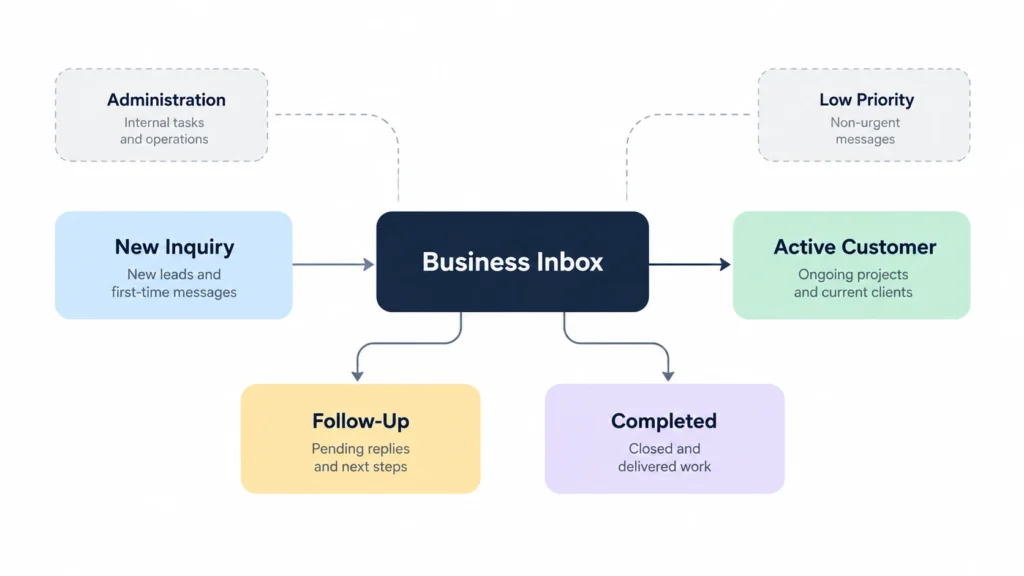
A useful email system starts with the business process.
For a service business, the highest-priority categories are usually connected to customer relationships and revenue opportunities.
A basic structure could include:
Customer Inquiry
For people who have contacted the business but have not yet become customers.
Active Customer
For ongoing customer conversations.
Follow-Up
For conversations where the next action has not yet been completed.
Appointments
For booking and scheduling communication.
Quotes
For estimates, proposals, and decisions waiting on the customer.
Administration
For invoices, vendors, software, and internal matters.
This does not mean you need six folders inside your inbox.
Labels, categories, filters, flags, or rules can provide the same organizational logic depending on the platform.
Gmail officially supports labels and filters, while Outlook supports folders, categories, rules, filtering, flags, and related organization features.
Separate “important” from “needs action”
This is one of the most useful distinctions in business email.
An email can be important but require no action.
Another email can look ordinary but require a response.
For example, a customer saying:
“Thanks, I’ll think about it.”
may not require immediate action.
But:
“Can you confirm whether Tuesday at 3 PM is available?”
does.
Your system should help you see that difference.
A follow-up label, flag, star, reminder, or task can be used to mark messages that still require something from you.
The exact feature depends on your email platform.
The principle does not.
Use automation for predictable messages
Rules are useful when the action is predictable.
For example:
- Newsletter → Newsletter
- Software receipt → Administration
- Supplier invoice → Vendors
- Website inquiry → Customer Inquiry
- Booking notification → Appointments
The first four are generally predictable.
But be careful with customer communication.
A rule that automatically moves every message containing a particular keyword can sometimes hide an important conversation.
For that reason, automation should reduce repetitive sorting without taking away visibility from messages that require human judgment.
Outlook’s official documentation describes rules as a way to automatically perform actions on incoming messages, including moving messages to folders based on conditions.
Make customer inquiries recognizable
Your organization strategy should not depend entirely on what happens after an email arrives.
The website or booking system generating the message matters too.
Compare these two subject lines:
Contact Form Submission
and
New Inquiry | Hair Color | Saturday Appointment
The second gives the business owner useful context immediately.
This is particularly valuable for businesses receiving multiple inquiries throughout the day.
If you control the website form, consider what information can safely and usefully appear in the notification subject and message preview.
Better inputs create better inbox decisions.
Give every customer message a next state
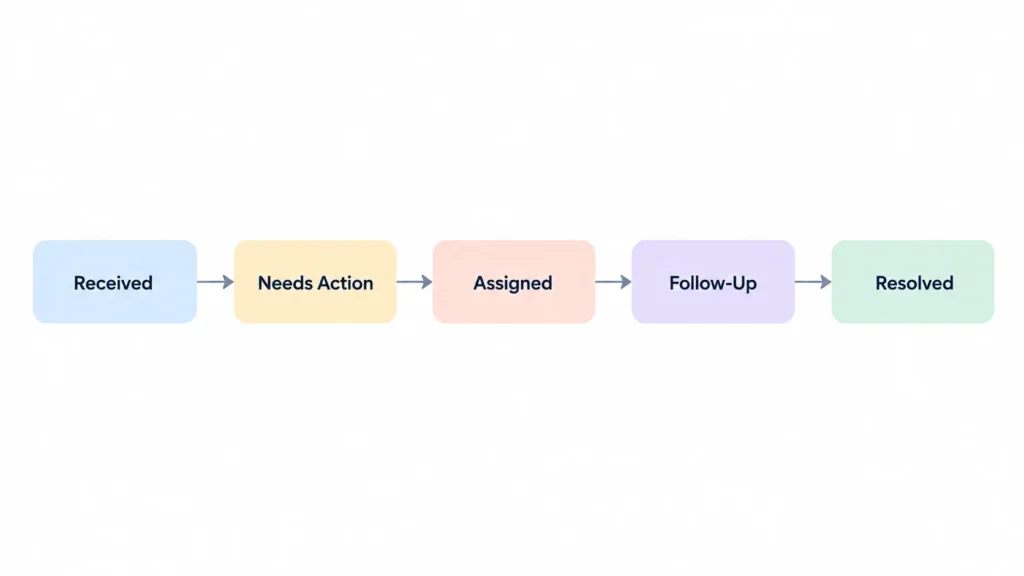
A customer conversation should not simply sit in the inbox indefinitely.
Ask:
What happens next?
Perhaps the answer is:
- Respond
- Send pricing
- Schedule appointment
- Wait for customer
- Follow up
- Confirm payment
- Archive
The customer does not need to know how you organize the message internally.
But your team does.
This is especially important when more than one person has access to the same business inbox.
Without clear ownership, two people may assume the other person is handling the customer.
That is how messages fall through the cracks.
Shared inboxes need responsibility, not just access
A common misconception is that giving several employees access to an inbox automatically creates better customer service.
It does not.
If five people can see an email but nobody knows who owns the response, the message can still be missed.
A simple internal rule can help:
Every customer message requiring action must have an owner.
That owner could be a person, department, or clearly defined role.
The system does not need to be complicated.
Even a simple category such as “Needs Response” combined with an assigned team member can improve accountability.
Do not create too many folders
More organization is not automatically better organization.
If employees have to choose between 18 folders before deciding where an email belongs, the system becomes a new source of friction.
Start with the smallest structure that solves the problem.
You can always expand it later.
A good test is:
Can someone new understand the inbox structure within a few minutes?
If not, simplify it.
Build a repeatable daily process
Even a well-designed system can fail if nobody reviews it.
A service business should decide when customer messages are checked and processed.
The appropriate frequency depends on the business.
A business that handles urgent appointment requests may need much faster monitoring than a consultant whose customers typically communicate asynchronously.
The important thing is to establish a clear expectation.
For example:
- Review new customer inquiries.
- Identify messages requiring action.
- Respond or assign the next task.
- Flag conversations that require follow-up.
- Archive completed conversations.
- Review unresolved messages before ending the workday.
The system should fit the business rather than forcing every business into the same schedule.
Archive completed conversations
Not every message needs to remain in the active inbox.
Once a conversation is complete, archive it or move it into the appropriate completed area.
That keeps active work more visible while preserving the conversation for future reference.
Outlook’s documentation specifically recommends archiving messages that have already been acted on when you want to keep them available without leaving them in the active inbox.
The important distinction is:
Archive is not delete.
You are reducing active clutter while keeping useful history.
Measure the system by customer experience
The success of an email organization system should not be measured by how beautiful the inbox looks.
Ask better questions:
- Are customer inquiries easier to identify?
- Are fewer messages waiting without an owner?
- Are follow-ups more consistent?
- Can the team quickly find active conversations?
- Are completed conversations separated from unfinished work?
- Are unnecessary notifications creating noise?
- Does everyone understand the workflow?
If the answer to these questions improves, the organization system is doing its job.
Start small
If your current inbox is already messy, do not attempt a complete rebuild in one afternoon.
Start with the messages that affect customers most.
Identify:
New inquiries → Active conversations → Follow-ups → Completed conversations
Then deal with routine noise.
Once that structure works, add rules and automation where they genuinely save time.
The goal is not to create the most sophisticated email system possible.
It is to create a system that makes the right customer message easier to see at the right time.
For a small service business, that can make a surprisingly meaningful difference.