

Have you ever started planning a website and realized you were making decisions before you had clearly defined the problem? You choose a homepage layout, collect competitor examples, think about colors and fonts, and perhaps even start discussing platforms. Then an important question appears: What is this website actually supposed to help the customer do?
That is where Claude can be useful.
Claude cannot replace your understanding of your customers, market, or business. But it can help you think through a website before development begins. You can use it to explore page structures, identify unanswered customer questions, review messaging, compare possible website directions, and turn scattered business information into a more organized plan.
For a service business, that planning stage matters because the website often needs to do more than present information. It may need to establish credibility, explain services, answer objections, show proof, guide visitors toward a consultation or booking, and make the next step obvious.
The better question is not, “Can Claude build my website?”
It is, “Can Claude help me make better decisions before I build it?”
In many situations, yes.
Start With the Customer Problem, Not the Website
A common mistake is to begin website planning with pages.
You start thinking about a Home page, About page, Services page, Contact page, and perhaps a Blog. That gives you a sitemap, but it does not necessarily give you a useful website strategy.
Before asking Claude for a sitemap, give it the information that actually determines what the website needs to accomplish:
- What the business sells
- Who typically buys it
- What customers ask before contacting the business
- What makes the business different
- What makes potential customers hesitate
- What action the visitor should take
- Which services or offers matter most
- What information customers need before making contact
For example, imagine a company providing commercial electrical services. Its customers may need to understand service areas, emergency availability, certifications, project experience, service categories, and how quickly they can request an assessment.
Those requirements should influence the website structure.
Claude can help you turn that information into questions such as:
What does a potential customer need to know before contacting this company?
Which questions should the website answer on the homepage?
Which questions deserve dedicated service pages?
What objections could prevent someone from making contact?
That is much more useful than simply asking for “a modern website structure.”
Give Claude Real Customer Questions
One of the most practical ways to use Claude during website planning is to work from the questions your customers already ask.
If someone repeatedly asks, “Do you serve my area?” that information probably belongs somewhere prominent.
If customers regularly ask, “How does your process work?” the website should probably explain the process instead of forcing every visitor to contact the business to find out.
If people hesitate because they are unsure about pricing, timelines, qualifications, guarantees, or what happens after submitting an inquiry, those concerns should influence the content strategy.
You can give Claude a list of real questions and ask it to organize them into:
- Questions that should be answered on the homepage
- Questions that belong on service pages
- Questions that should become FAQs
- Questions that may require stronger trust elements
- Questions that the business should answer during the sales process
This changes website planning from “What pages should we create?” to “What does the customer need to understand?”
That is a much stronger starting point.
Use Claude to Challenge Your Existing Website
Claude can also be useful when you are not starting from scratch.
If you already have a website, provide the relevant content, screenshots, page copy, or other available information and ask Claude to review it from the perspective of a potential customer.
Instead of asking:
“Is my website good?”
ask more specific questions:
“What information would a first-time visitor still be looking for?”
“Where could the messaging be unclear?”
“What might make a visitor hesitate before contacting us?”
“Which sections appear more important than they actually are?”
“What is missing from the current customer journey?”
Specific questions produce more useful analysis than a general request for an opinion.
Claude is particularly helpful when you use it as a thinking partner rather than as an authority that gives you a final answer.
Build More Than One Sitemap Before Choosing One
A website does not have to follow the same structure as every other business in its industry.
Claude can help you explore different approaches before development starts.
For example, a service company might consider:
Structure A: Service-first
Home → Services → Individual Service Pages → About → Case Studies → Contact
Structure B: Problem-first
Home → Problems We Solve → Solutions → Industries → Process → Contact
Structure C: Trust-first
Home → Why Choose Us → Results / Work → Services → Process → About → Contact
None of these is automatically right.
The appropriate structure depends on what customers need to understand and how they make decisions.
The value of Claude here is not that it magically knows which structure will perform best. The value is that it can help you explore alternatives and explain the reasoning behind each one before you spend time building the wrong structure.
A Sitemap Is Only the Beginning
A sitemap tells you what pages exist. It does not tell you what each page needs to accomplish.
Once you have a possible structure, ask Claude to turn each important page into a simple strategic brief.
For a service page, that might include:
- The customer’s problem
- The service promise
- Key benefits
- Important information
- Trust elements
- Common objections
- Supporting proof
- Primary call to action
- Related services or next steps
This is where website planning becomes more useful.
A page should not exist simply because competitors have one. It should exist because it helps the visitor understand something important or move toward a meaningful next step.
Let Claude Explore Different Homepage Messages
Your homepage is often asked to do too much.
It introduces the company, explains services, establishes credibility, answers questions, shows proof, and guides visitors toward an action. When everything is given equal importance, the result can become unclear.
Claude can help you explore different messaging directions.
For example, you could ask it to create three homepage positioning options based on:
- The primary customer problem
- The main business advantage
- The strongest customer outcome
Then compare the options against the actual business.
The goal is not to let Claude choose your positioning. It is to make the alternatives visible so you can make a more informed decision.
Give Claude Your Existing Content Before Asking for New Content
If the business already has useful material, do not start by asking Claude to invent everything.
Give it the information you already have:
- Existing website copy
- Service descriptions
- Brand messaging
- Customer FAQs
- Sales documents
- Brochures
- Reviews
- Process information
- Internal notes
Anthropic explains that Projects can ground Claude’s work in internal knowledge such as style guides, codebases, transcripts, and previous work, while Artifacts can help users create and work with outputs such as website designs.
The principle is simple: better business context usually leads to more relevant planning.
A website strategy built from real business information is more useful than one built from a generic description of an industry.
Use Claude to Find Content Gaps
Once the structure is taking shape, Claude can help identify what is still missing.
Ask it to review the proposed customer journey and identify questions that remain unanswered.
For example:
“A visitor has found this service page. What could still prevent them from contacting the business?”
That question may reveal missing information about:
- Process
- Service area
- Qualifications
- Timeline
- Pricing expectations
- Guarantees
- Communication
- Next steps
- Trust
This is especially useful because website problems are not always design problems.
Sometimes the layout is perfectly acceptable, but the visitor still does not have enough information to make a decision.
Explore the Customer Journey Before You Build
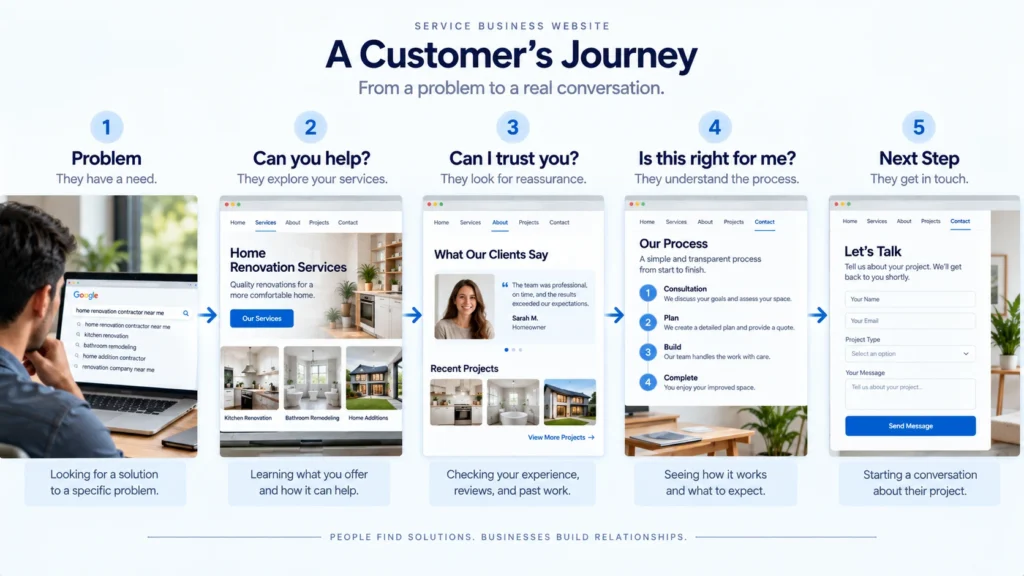
A strong website should make sense as a journey, not just as a collection of pages.
Think about a visitor arriving with a specific problem.
They may first ask:
“Can you solve my problem?”
Then:
“Are you credible?”
Then:
“Is this right for my situation?”
Then:
“What happens if I contact you?”
Finally:
“What should I do next?”
Claude can help you map those questions across the website.
This can reveal whether the homepage is doing too much, whether service pages need more detail, whether trust elements appear too late, or whether the call to action is being presented before the visitor has enough context.
Use Artifacts for Early Exploration, Not Final Approval
Anthropic describes Artifacts as a dedicated workspace for creating, viewing, and iterating on outputs such as code, flowcharts, graphics, websites, and interactive dashboards.
This can be valuable during early website planning.
Instead of discussing an idea only through words, you can explore a rough concept and ask:
“Show me a homepage direction that emphasizes the customer’s main problem.”
Then try another:
“Show me a version that emphasizes trust and proof.”
The purpose is exploration.
A prototype can help you see whether an idea makes sense, but it does not automatically mean the design is ready for production. Content hierarchy, accessibility, responsiveness, technical constraints, performance, brand consistency, SEO, forms, integrations, and conversion details still need deliberate review.
Do Not Let Claude Make the Final Business Decisions
This is the most important limitation to remember.
Claude can generate possibilities. It can organize information. It can identify patterns and ask useful questions.
But it does not know your business in the same way you do.
It may suggest a page because the pattern appears common. It may recommend messaging that sounds persuasive but does not accurately represent your offer. It may misunderstand a customer segment or make assumptions from incomplete information.
That is why the strongest workflow is:
Business knowledge → Claude-assisted exploration → Human judgment → Website strategy → Design → Development
Not:
Claude → Website
The difference is significant.
Accessibility Should Be Considered Before Development
Accessibility should not be something you remember after the website is finished.
W3C’s WCAG 2.2 guidance organizes accessibility around four principles: perceivable, operable, understandable, and robust. WCAG 2.2 also provides testable success criteria for conformance.
Claude can help you create an accessibility review checklist or identify areas that deserve attention, but accessibility should still be validated properly during design and development.
For example, planning should consider:
- Clear content hierarchy
- Keyboard accessibility
- Form labels and error handling
- Sufficient text contrast
- Meaningful alternative text
- Visible focus states
- Understandable navigation
- Accessible interactive elements
The important point is that accessibility belongs in the planning conversation, not just the final testing stage.
A Practical Claude-Assisted Website Planning Process
If you want to use Claude for a real website project, keep the process simple.
1. Gather the business information
Collect your services, audience, positioning, customer questions, existing content, proof, and business goals.
2. Ask Claude to identify the customer questions
Focus on what visitors need to understand before taking action.
3. Explore several website structures
Ask for different sitemap approaches and the reasoning behind each.
4. Turn the structure into page strategies
Define the purpose, information, objections, trust elements, and next action for each important page.
5. Review the existing content
Identify what can be reused, improved, combined, or removed.
6. Explore homepage and service-page directions
Use Claude to compare messaging and information hierarchy.
7. Create rough visual concepts
Where useful, use Artifacts or another design workflow to explore early ideas.
8. Apply professional judgment
Review everything against the actual business, customer expectations, brand, technical requirements, accessibility needs, and implementation realities.
Only then should the project move confidently into detailed design and development.
Where Claude Adds the Most Value
Claude is particularly useful when the problem is thinking, organizing, questioning, and exploring.
It can help you turn scattered information into a structured website brief, find gaps in your customer journey, generate alternative approaches, and make an early idea easier to discuss.
That can save time before design and development begin.
But the quality of the result depends heavily on the information you provide and the judgment you apply afterward.
What Claude can help with
- Website planning
- Sitemap exploration
- Customer-question analysis
- Content organization
- Messaging alternatives
- Customer journey mapping
- Content-gap analysis
- Early prototypes and concepts
- Planning checklists
What still requires human judgment
- Business positioning
- Customer understanding
- Final information architecture
- Brand decisions
- Conversion strategy
- Accessibility validation
- Technical feasibility
- SEO implementation
- Final design quality
- Production development
A Better Prompt for Your Next Website Project
Instead of asking Claude:
“Create a website for my business.”
give it enough context to think strategically.
Try something closer to this:
I am planning a new website for [business].
Business: [describe the business]
Primary services: [list services]
Typical customers: [describe customers]
Main customer problems: [list problems]
Common questions before contacting us: [list questions]
What makes the business different: [explain]
Primary action I want visitors to take: [call, book, request a quote, buy, etc.]
Existing website/content: [provide information]
Help me plan the website before designing it. Identify the main customer questions, recommend a few possible website structures, explain the trade-offs, suggest the purpose of each important page, identify content gaps, and outline a practical customer journey. Do not make assumptions where information is missing. Ask me to provide the missing business context instead.
That last instruction is important.
You want Claude to identify uncertainty rather than quietly inventing answers.
A Smarter Way to Use Claude for Website Planning
Claude can be a useful part of website planning, especially when you use it before design and development rather than expecting it to make every decision for you.
The biggest opportunity is not simply generating more website content. It is thinking through the website before you spend time building it.
If Claude helps you discover that your sitemap is wrong, your homepage message is unclear, your service pages are missing important information, or your customer journey has a gap, it has already created value before a single page is developed.
A better website usually starts with better questions.
If you’re planning a website and the difficult part is deciding what the site should actually say, how it should be organized, or what customers need to see before taking action, using Claude as a structured thinking partner can help you work through those decisions more clearly. The final strategy should still come from the combination of business knowledge, customer understanding, professional judgment, and careful implementation.