

A local service website can lose a potential customer without ever showing an obvious error.
The page may load. The images may look professional. The contact button may work. The website may even pass a basic automated scan.
But if a visitor cannot comfortably read the content, navigate the menu, understand a form, operate the interface, or interpret important information, the website still has a business problem.
That is where accessibility deserves a different conversation.
Instead of asking only, “Is our website compliant?”, business owners should also ask, “How many unnecessary barriers are we creating for people who are trying to use our website?”
That second question is much closer to business growth.
Accessibility Connects Directly to Website Usability
Accessibility and usability are not identical, but they often intersect.
The W3C describes WCAG as an international standard for making web content more accessible to people with disabilities. WCAG 2.2 organizes accessibility around four principles: perceivable, operable, understandable, and robust.
For a service business, those principles can be translated into practical website questions.
Perceivable: Can visitors access and understand the information?
Operable: Can they navigate and interact with the website?
Understandable: Are the content, navigation, instructions, and forms clear?
Robust: Does the experience work reliably across the technologies and methods people use to access it?
Once translated into these questions, accessibility becomes much less abstract.
Why This Matters More for Local Service Businesses
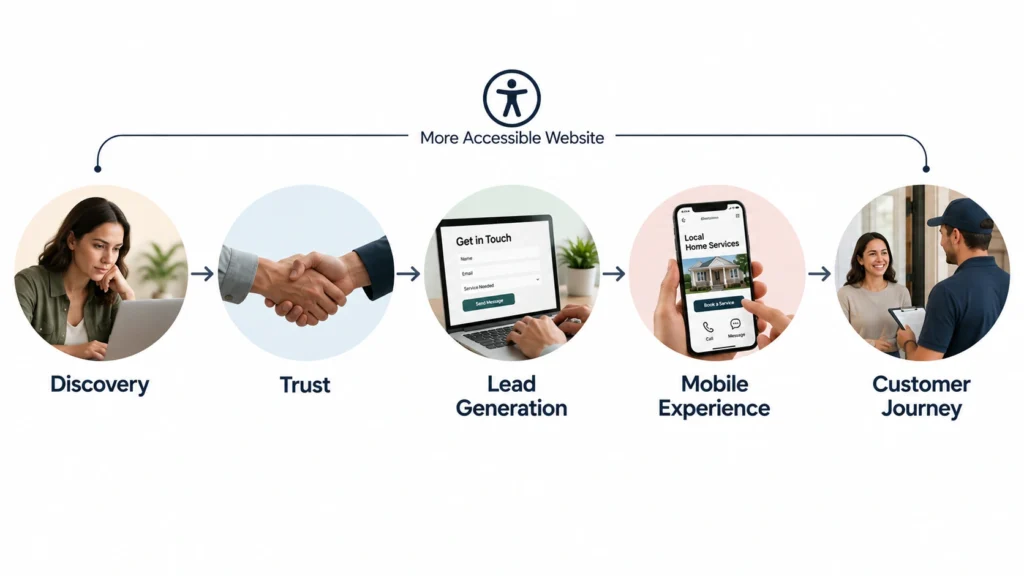
Local service businesses often depend on a relatively short digital journey.
Someone searches for a service.
They land on a page.
They decide whether the company appears relevant.
They look for proof or details.
Then they call, submit a form, request a quote, book an appointment, or visit the business.
There may not be ten different steps between discovery and conversion.
That makes each important interaction more valuable.
If a service page is difficult to understand or the contact process is difficult to complete, there may be very little else on the website that can compensate for that friction.
The Business Opportunity Is Not “More Accessibility Features”
A common mistake is to think of accessibility as adding features.
That is not necessarily the right approach.
Good accessibility often means removing unnecessary complexity.
For example, a clearer heading structure does not make a website more complicated. It gives the content a better hierarchy.
A properly labeled form does not create extra work for the customer. It makes the required action easier to understand.
A visible keyboard focus state does not distract every visitor. It gives keyboard users a clear indication of where they are.
Better contrast does not require more content. It simply makes existing content easier to perceive.
This is why accessibility can be treated as a quality improvement rather than a separate feature list.
Five Areas Where Accessibility Can Affect Business Performance
1. Service Discovery
A customer should be able to identify what the business does without having to interpret a confusing layout.
Clear headings, logical content structure, descriptive links, and readable text can make service discovery easier.
2. Trust
A website that communicates clearly and works predictably creates a more professional experience.
Accessibility does not automatically create trust, but careless digital experiences can create doubt.
3. Lead Generation
Contact forms are particularly important for service businesses.
If fields are unclear, errors are difficult to understand, or keyboard interaction is problematic, a visitor may abandon the process.
4. Mobile Experience
Accessibility also matters on mobile devices. W3C notes that accessibility guidance can support users across desktops, laptops, tablets, and mobile devices, while accessible practices can often improve general usability as well.
5. Customer Experience After the Click
Accessibility does not end at the homepage.
If a visitor clicks an appointment link, opens a menu, reads a service page, watches a video, or completes a form, the interaction still needs to work.
The whole journey matters.
Accessibility Can Reach Beyond the Disability Conversation
One of the strongest reasons to approach accessibility strategically is that the benefits are not always limited to disabled users.
Someone may have reduced vision.
Someone may be using a phone in bright sunlight.
Someone may have a temporary injury.
Someone may prefer captions because they are in a public environment.
Someone may be an older customer who finds small text or complicated interactions difficult.
The W3C business case notes that accessibility can improve experiences across different users, devices, contexts, and circumstances.
This is important for local businesses because the goal is not to design for an imaginary “average customer.”
It is to make the website useful to real people.
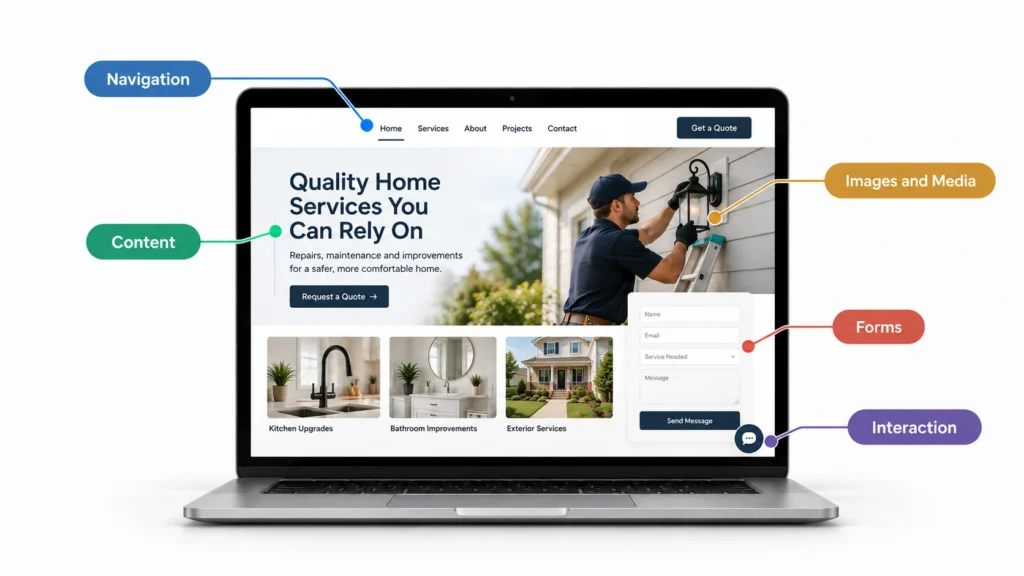
What an Accessibility-Focused Website Review Should Look At
A practical review should go beyond running an automated accessibility checker.
Start with the important customer journeys.
Navigation
Can someone move through the main navigation using a keyboard?
Are links and buttons clearly distinguishable?
Can visitors understand where they are?
Content
Are headings meaningful?
Is the text readable?
Does the content have enough contrast?
Are important instructions clearly communicated?
Images and Media
Do meaningful images have appropriate alternatives?
Does important video content provide suitable alternatives such as captions where needed?
Forms
Are fields properly labeled?
Can users identify required information?
Are errors clearly communicated?
Can someone navigate through the form without relying solely on a mouse?
Interaction
Are buttons understandable?
Are focus states visible?
Do interactive components behave predictably?
These checks are not a complete accessibility audit, but they provide a much more useful starting point than asking whether the homepage “looks accessible.”
Accessibility Should Be Built Into the Website Process
Accessibility becomes harder and more expensive to address when it is treated as a final-stage repair project.
It is much easier to think about contrast while choosing the visual system, heading structure while building the content architecture, keyboard interaction while developing components, and form accessibility while creating the lead-generation experience.
That does not mean every accessibility issue disappears automatically.
It means accessibility becomes part of the design and development conversation.
That is a better process.
Compliance Still Matters, But Context Matters Too
Accessibility laws and standards vary by market and business type.
For example, the U.S. Department of Justice’s specific Title II web and mobile accessibility rule concerns state and local government entities. It should not be interpreted as a universal statement that every private local business has identical obligations.
In the European Union, the European Accessibility Act covers specific products and services, including e-commerce, with defined scope and requirements.
That is why businesses should avoid generic “ADA compliant” or “EAA compliant” claims without understanding what actually applies to them.
The smarter approach is to identify the relevant requirements and then improve the website experience accordingly.
Where to Start If Your Website Is Already Live
You do not necessarily need to rebuild the entire website immediately.
Start with the pages closest to business outcomes.
Review:
- Homepage
- Main service pages
- Contact or quote forms
- Booking or appointment flows
- Navigation
- Important calls to action
- High-traffic landing pages
- Important media and downloadable content
Then prioritize the problems that could actually prevent someone from understanding the service or taking the next step.
That is more useful than trying to fix every minor issue at once.
Accessibility Is Also a Brand Decision
A business website communicates more than services and prices.
It communicates how the company thinks about its customers.
A website that makes information difficult to access sends one message.
A website designed to accommodate different users sends another.
That does not mean accessibility should become a marketing slogan.
It means the underlying experience should support the brand promise.
If a business says it cares about customers, its digital experience should make that care practical.
The Better Business Question
Instead of asking:
“Do we need accessibility?”
Ask:
“Where could our website be unnecessarily difficult for someone who wants to use our service?”
That question leads to better decisions.
It moves the conversation away from fear and toward customer experience.
It also makes prioritization easier.
You can identify the important journeys, find the barriers, understand their impact, and improve the experience in a sensible order.
Final Thought
Accessibility should absolutely be taken seriously from a legal and ethical perspective.
But local service businesses should not stop there.
The bigger opportunity is to create a website that more people can understand, navigate, trust, and use.
That is good website strategy.
And when accessibility is considered during planning, design, content, development, and testing, it becomes part of building a better digital experience rather than an emergency project after launch.
If your website is already generating traffic but some parts of the customer journey feel unnecessarily difficult, accessibility is worth reviewing alongside your broader UX and conversion strategy.