
If you are planning an ecommerce website, the WooCommerce vs Shopify discussion can become confusing very quickly.
One person tells you WooCommerce gives you complete control.
Another says Shopify is easier and more reliable.
Someone else starts comparing app counts, themes, pricing, or transaction fees.
All of those conversations can be useful, but they can also distract you from the question that matters most:
What kind of control does your business actually need?
That is the better way to compare these platforms.
WooCommerce and Shopify are not simply two tools that happen to sell products online. They represent two different approaches to building and managing an ecommerce business.
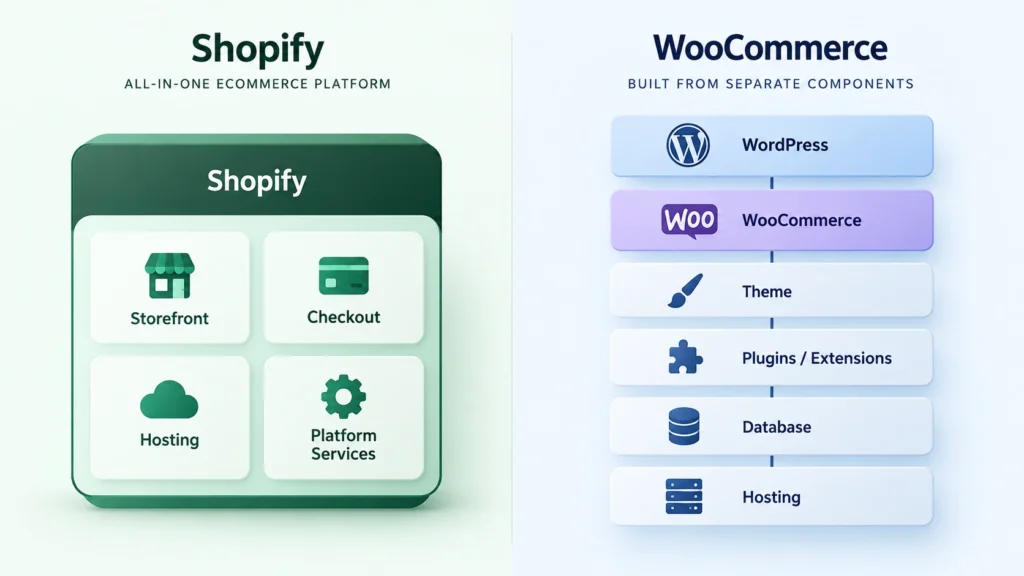
WooCommerce gives you an open-source WordPress-based environment with significant control over the website stack. Shopify provides a hosted ecommerce platform where much of the technical infrastructure is managed for you.
Once you understand that difference, the rest of the comparison becomes much easier.
The First Difference Is the Environment
WooCommerce works within WordPress.
That means your ecommerce website can be part of a broader WordPress ecosystem containing your pages, blog, content, SEO tools, plugins, custom functionality, theme, database, and hosting environment.
WooCommerce’s official documentation describes the platform as open source and customizable, while its developer documentation explains how developers can extend functionality through plugins, themes, hooks, and custom extensions.
Shopify takes a more managed approach.
You create an account, select a plan, build the store, configure your products and payments, choose a theme, install apps, and operate within Shopify’s hosted environment.
That reduces infrastructure decisions.
For many businesses, that is a major advantage.
Control Is Valuable, But Only If You Use It
More control sounds attractive.
But control creates responsibility.
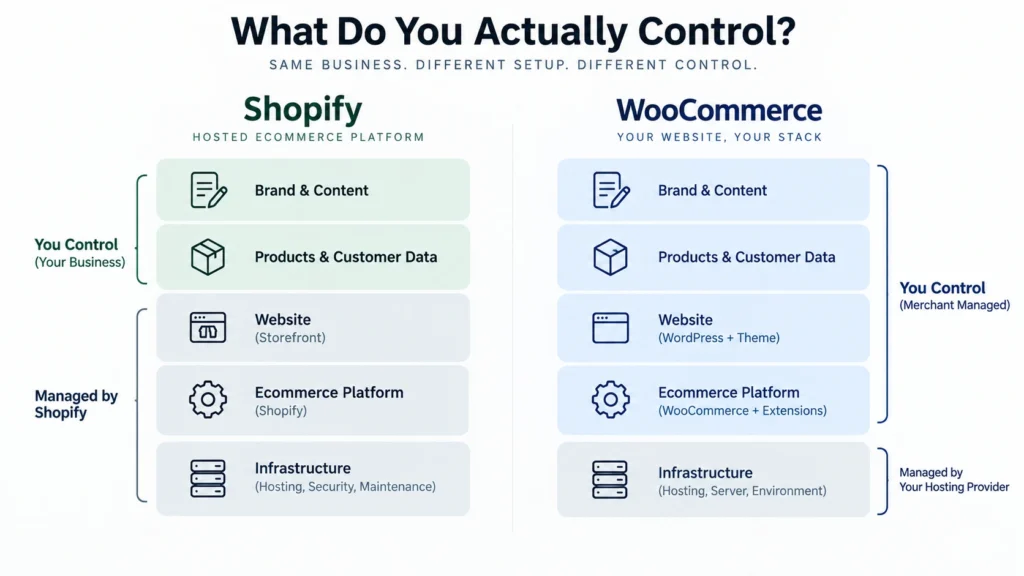
With WooCommerce, you can choose your hosting provider and have much greater control over the underlying website environment. You can work with WordPress themes and plugins, modify functionality, access the database, and build custom solutions.
That can be excellent for businesses with unusual requirements.
It can also create more work.
You need to maintain the environment. You need to evaluate extensions. You need backups. You need security processes. You need to consider compatibility when updating components.
Shopify removes much of that infrastructure burden.
You are not choosing your own server architecture or maintaining a WordPress installation.
That makes the platform less open at the infrastructure level, but it can make the business easier to operate.
The important question is not whether control is good.
It is whether the additional control creates enough business value to justify the additional responsibility.
Shopify’s Flexibility Is More Structured
There is an outdated idea that Shopify is simply a closed platform where you can only change colors, fonts, and product images.
That is not an accurate description of the current platform.
Shopify supports theme-code customization, apps, APIs, extensions, and Functions. Its documentation explains that apps can extend the online store, checkout, customer accounts, and point-of-sale experiences, while Functions can modify areas such as discounts, payments, delivery, and checkout logic.
You can also edit theme code using Liquid alongside HTML, CSS, JSON, and JavaScript.
So Shopify can support sophisticated ecommerce implementations.
The difference is that you are extending a managed platform.
You are not controlling the entire platform underneath it.
WooCommerce’s Flexibility Extends Further Down the Stack
WooCommerce gives developers more room to work with the underlying website.
A developer can create or modify WordPress plugins, develop WooCommerce extensions, customize themes, work with WordPress hooks, and control the hosting environment.
WooCommerce’s developer documentation specifically explains that functionality can be changed through extensions and that advanced functionality can be implemented through custom development.
That makes WooCommerce especially interesting for businesses with requirements that are difficult to fit into a standard ecommerce platform.
For example, consider a company that needs ecommerce alongside a highly customized content system, a specialized product configuration process, unusual wholesale workflows, or deep integration with internal business software.
WooCommerce may provide the architectural freedom required to build around those needs.
But again, the development work has to be planned and maintained properly.
Ownership Matters More as the Store Becomes Important
When an ecommerce store is small, platform choice can feel like a simple software decision.
When the store becomes a major part of the business, it becomes an infrastructure decision.
Your store may contain:
- Product information
- Customer records
- Orders
- Content
- SEO configuration
- Marketing integrations
- Custom functionality
- Business workflows
- Analytics
- Brand assets
- Customer experience decisions
At that point, you should understand what you control and what the platform controls.
Shopify’s terms state that materials you provide remain yours, but Shopify controls the hosted service and can modify its services and features under its terms.
WooCommerce operates differently because the software is open source and product information is stored within your WordPress database. WooCommerce also documents methods for moving product data between sites or systems.
This does not mean Shopify is unsafe for business ownership.
It means the two platforms distribute control differently.
Migration Is Part of Ownership
You do not need to plan a migration today to benefit from thinking about one.
Ask yourself:
“If I ever need to leave this platform, what exactly am I taking with me?”
Shopify provides official tools for exporting products and orders, and customer information can be imported and exported through CSV workflows.
WooCommerce can also export product data and use WordPress-based migration approaches because product information is stored within the WordPress database.
But migration is never just about product CSV files.
A real ecommerce migration can involve:
- Product and customer data
- Orders
- URLs
- Redirects
- SEO metadata
- Images
- Design
- Integrations
- Automation
- Checkout behavior
- Tracking
- Custom functionality
That is why platform selection should happen before development begins, not after the website has become deeply dependent on a particular architecture.
Checkout Is a Good Example of the Ownership Difference
Checkout is where platform boundaries become especially relevant.
Shopify provides a structured checkout environment, but some checkout customization capabilities depend on the plan. Shopify’s documentation states that some checkout customization is available on Basic and higher plans, while deeper customization of certain checkout areas is limited to Shopify Plus.
For many stores, this will never become a problem.
For a business where checkout logic is central to the customer journey, it deserves careful attention.
WooCommerce provides a different model because the checkout exists inside your WordPress and WooCommerce environment, giving developers more direct control over the website’s code and functionality.
That additional freedom can be useful.
It can also mean more responsibility for making sure the checkout remains stable, secure, fast, and compatible with the rest of the stack.
Which One Is Better for a Growing Business?
Growth does not automatically mean WooCommerce.
It also does not automatically mean Shopify.
A growing business needs to ask what kind of growth it is experiencing.
If growth mainly means:
- More products
- More customers
- More marketing
- More orders
- More traffic
- More operational activity
Shopify may provide a very practical foundation.
If growth means:
- More complex business rules
- Custom workflows
- Advanced integrations
- Specialized customer experiences
- Complex product structures
- Deeper control over the technology stack
WooCommerce may become more attractive.
The platform should support the kind of complexity your business is actually developing.
A Practical Comparison
| Factor | WooCommerce | Shopify |
| Hosting | Choose your own | Managed by Shopify |
| Open-source foundation | Yes | No |
| Infrastructure control | High | Lower |
| Theme customization | Broad | Broad |
| App/extension ecosystem | Large | Large |
| Custom code | Very broad control | Supported within Shopify architecture |
| Checkout flexibility | Broad website-level control | Structured, with some plan limitations |
| Maintenance responsibility | Higher | Lower |
| WordPress integration | Native | Separate platform |
| Migration control | High at site/database level | Strong export tools, but platform architecture remains Shopify-controlled |
| Ideal strength | Control and customization | Managed ecommerce operations |
Choose Shopify If Simplicity Is Part of Your Strategy
Shopify is often the better fit when technical simplicity has business value.
If you want your team to focus on products, customers, marketing, fulfillment, and growth rather than website infrastructure, a hosted platform can remove unnecessary operational work.
It can also make the development process more predictable when your requirements fit naturally within Shopify.
That is an important distinction.
You are not choosing Shopify because it has fewer possibilities.
You are choosing it because you may not need to control every layer.
Choose WooCommerce If Control Is Part of Your Strategy
WooCommerce becomes more compelling when your website is more than a standard online store.
If the website needs to behave like a customized business system, WooCommerce can give developers much more room to build.
You can control hosting, WordPress, themes, plugins, custom code, database-level architecture, and WooCommerce functionality.
That can be a significant advantage.
But it should come with a proper maintenance plan.
The biggest mistake is building a highly customized WooCommerce store and then treating maintenance as an afterthought.
The Better Platform Is the One That Matches Your Operating Model
A platform is not just software.
It becomes part of how the business operates.
That means the right choice depends on:
Your team: Who will manage the website?
Your business model: How standard or unusual is the ecommerce workflow?
Your technical requirements: What needs to be customized?
Your maintenance capacity: Who handles updates, backups, security, and troubleshooting?
Your growth model: What type of complexity is likely to increase?
Your ownership expectations: How much of the technology stack do you want to control?
Once those questions are answered, the platform decision becomes much less emotional.
The Strategic Choice
If your requirements are relatively standard and you want a managed ecommerce environment, Shopify can be the cleaner operational choice.
If your website requires deep customization, WordPress integration, unusual business logic, or greater control over the underlying technology, WooCommerce can be the stronger choice.
Neither decision is permanent in theory.
But changing ecommerce platforms later can be expensive, disruptive, and technically complex.
That is why the best time to think about ownership and flexibility is before the store is built.
If you are comparing the two platforms for an upcoming ecommerce project, start by mapping your business requirements before comparing themes, apps, or feature lists. The clearer the requirements are, the easier it becomes to see which platform actually fits.