
A service-business website does not become better simply because it uses a premium page builder.
That is worth saying before discussing Elementor Pro.
The real question is what the additional capabilities allow you to do differently.
For a small service business, Elementor Pro can provide more control over templates, dynamic content, forms, popups, styling, and certain website structures. But whether those capabilities are useful depends heavily on how the website is expected to work.
If the site is five simple pages and rarely changes, many of the advanced features may not matter.
If the website has dozens of services, lead-generation requirements, reusable layouts, content-heavy sections, or an ongoing marketing strategy, the calculation changes.
Think About the Website as a Business Tool
A service website usually has several jobs.
It needs to explain what the business does.
It needs to build enough trust for someone to consider contacting the company.
It needs to make important information easy to find.
And in many cases, it needs to turn interest into an inquiry.
That means the website is not only a design project.
It is part of the business process.
Elementor Pro’s current feature set includes Theme Builder, dynamic content, forms, popups, custom code and CSS, and ecommerce capabilities depending on the plan.
The important question is which of those capabilities actually support your business process.
Theme Builder Can Reduce Repetitive Design Work
Consider a service company with 25 service pages.
If every service page has to be designed manually, maintaining consistency becomes harder.
You may update one page but forget another.
You may change the CTA on some pages but not others.
You may redesign the service-page layout and realize that the same work has to be repeated.
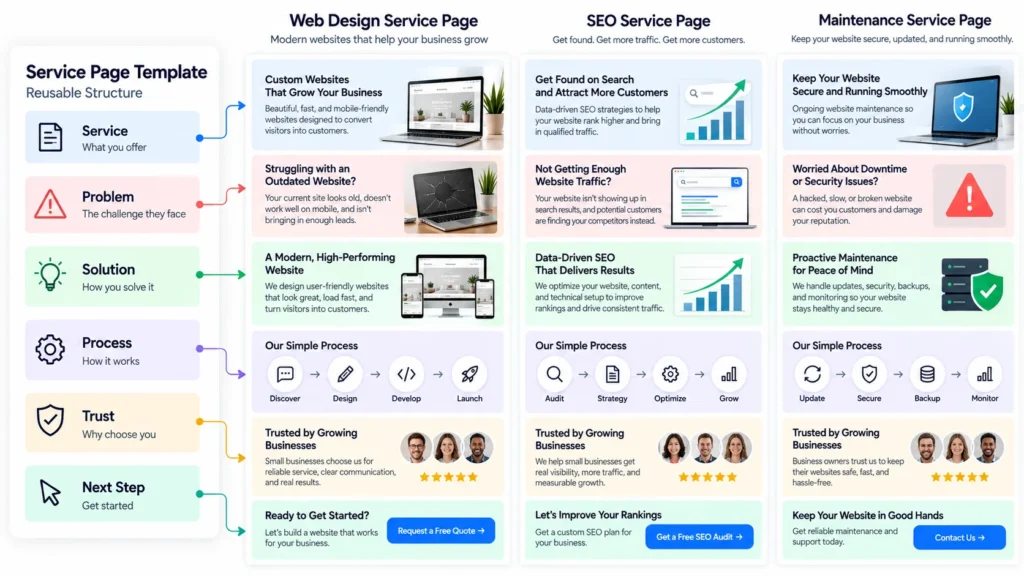
A reusable template changes that workflow.
Elementor’s Theme Builder is designed for custom templates across theme areas such as headers, footers, single posts, and archive pages.
For a growing business website, this can make a meaningful difference.
Consistency Is More Than Visual Branding
When people talk about consistency, they often mean colors and fonts.
Those matter.
But website consistency also includes structure.
If every service page follows a logical pattern, visitors learn how to navigate the information.
They know where to look for:
- What the service includes
- Who it is for
- What the process looks like
- Why the business is different
- What the next step is
That can make the website easier to understand.
The template is therefore not just a design convenience.
It can become part of the user experience.
Dynamic Content Helps When the Website Starts Growing
A five-page website does not necessarily need a sophisticated content architecture.
A 50-page website may.
Elementor’s dynamic content system can pull information from WordPress content into layouts, which can be useful when repeated page structures need different content.
Imagine a business with:
- 20 services
- 10 locations
- 15 case studies
- A regularly updated blog
Manually managing every repeated element can become inefficient.
A more structured approach lets the content and presentation work together.
Forms Can Become Part of Lead Qualification
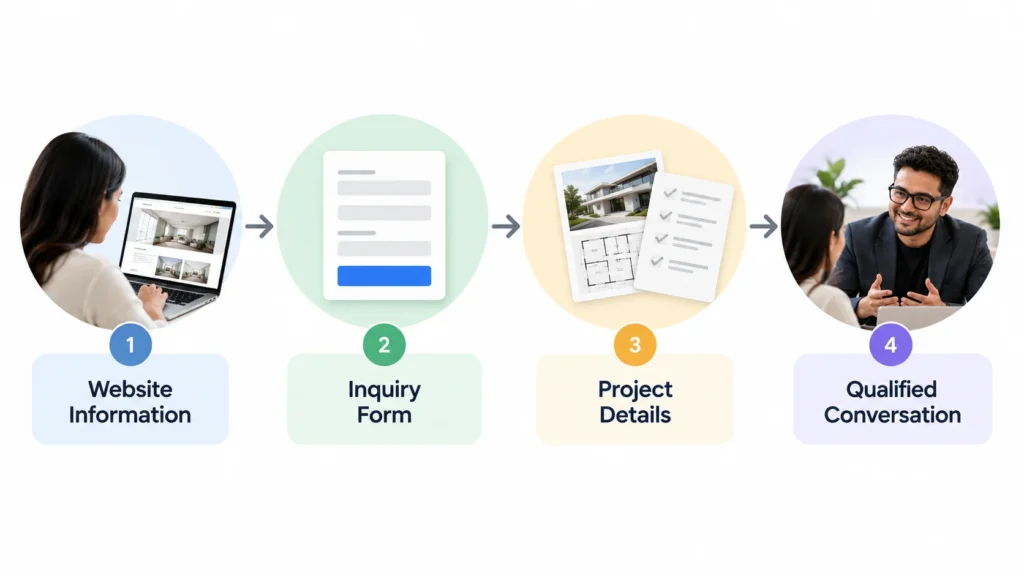
A service business should not think of forms as an afterthought.
The form is one of the points where website interest becomes a potential business conversation.
A basic contact form may be enough for some companies.
Others may need to understand:
- What service is needed
- Where the customer is located
- Project type
- Approximate scope
- Preferred timing
- How the customer heard about the business
Elementor Pro’s Form Builder can provide more control over the form experience and integrations depending on the plan.
The important part is not collecting the maximum amount of information.
It is collecting the right information.
A Short Form Can Sometimes Be Better
More fields do not automatically mean better leads.
If someone needs to complete 15 fields before asking a simple question, the form may become a barrier.
A good service-business form should match the decision stage.
Early-stage visitors may need a simple inquiry.
People requesting a detailed quote may be comfortable providing more information.
That is a UX decision.
Elementor Pro simply gives you more tools to build the experience.
Popups Need a Reason to Exist
Popups can help businesses promote:
- Guides
- Consultations
- Newsletter subscriptions
- Campaigns
- Special offers
- Important announcements
But they can also damage the experience.
A popup that appears immediately may interrupt someone who is still trying to understand the service.
A popup triggered after meaningful engagement can have a completely different role.
Elementor provides display conditions, triggers, and advanced rules for supported Popup Builder plans.
The feature is useful.
The strategy determines whether it is actually helpful.
Custom CSS Helps When Standard Controls Stop Being Enough
Most business websites do not need unusual CSS everywhere.
But designers eventually encounter situations where the default controls do not provide enough precision.
You may need a particular:
- Hover state
- Spacing adjustment
- Responsive behavior
- Button treatment
- Border effect
- Typography treatment
Elementor Pro’s custom CSS capability allows more granular styling control.
That can be especially useful when the goal is to create a design that does not look like it came directly from a template.
Custom Code Is Useful, But It Should Be Used Carefully
The same principle applies to Custom Code.
Elementor supports HTML, JavaScript, and CSS through its Custom Code feature.
That can be useful for tracking scripts, analytics snippets, front-end behavior, and other technical requirements.
But custom code should not become a dumping ground.
If a business needs functionality that belongs at the WordPress/PHP level, that is a different technical problem.
More options do not remove the need for good implementation decisions.
The Real Advantage Is Control
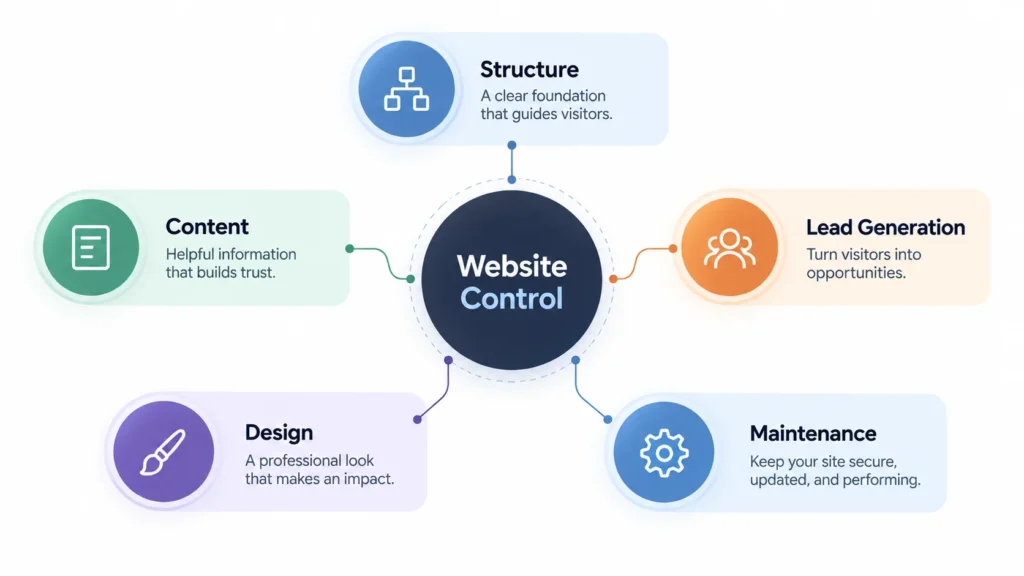
When you put all of these capabilities together, Elementor Pro’s main business value becomes easier to understand.
It can give a website team more control over:
Structure
How recurring pages and theme areas are built.
Content
How information is pulled into reusable designs.
Lead generation
How forms and conversion elements are presented.
Design
How the visual system is controlled and customized.
Maintenance
How repeated structures can be changed more efficiently.
That is a more useful way to evaluate Pro than counting widgets.
Where Pro May Not Be Necessary
There are situations where I would not recommend adding Pro.
For example, a small business may have:
- Five static pages
- No complex content
- One basic contact form
- No popup strategy
- No dynamic content
- No need for advanced customization
If the free version already handles the requirements, there may be little reason to introduce additional complexity.
A premium tool is not automatically a better decision.
Where Pro Starts Making More Sense
I would look more seriously at Pro when a service website has:
- Many similar pages
- Reusable page structures
- Dynamic information
- More sophisticated forms
- Marketing campaigns
- Custom design requirements
- Growing content
- Multiple content types
- A need for greater control over site-wide presentation
At that point, the value is not simply about design freedom.
It is about reducing repetitive work and creating a more structured website.
What Pro Does Not Replace
This is where businesses sometimes make the wrong investment.
Elementor Pro does not replace:
- Website strategy
- UX planning
- Conversion thinking
- Good copy
- SEO strategy
- Professional photography
- Brand positioning
- Good hosting
- Performance optimization
- Clear offers
The tool can help implement a strategy.
It cannot create the strategy for you.
A beautifully designed website can still have poor messaging.
A perfectly styled form can still ask the wrong questions.
A dynamic service template can still contain weak content.
Technology amplifies decisions.
It does not automatically improve them.
How to Decide Without Overthinking It
Instead of asking whether Elementor Pro is “worth it,” map the requirements.
Start with your pages.
How many service pages do you expect?
Then look at content.
Do multiple pages use the same information structure?
Then look at lead generation.
Do you need more than a basic contact form?
Then look at design.
Do you need deeper control than the standard widgets provide?
Finally, look at growth.
Will the website remain small, or are you planning to add services, locations, resources, campaigns, or content?
That sequence will tell you much more than a feature comparison table.
The Better Question
The wrong question is:
“What does Elementor Pro have?”
The better question is:
“Which business problems would those features solve for my website?”
If the answer is none, you probably do not need them.
If the answer includes reusable service-page templates, dynamic content, lead qualification, structured content, and more advanced design control, Pro may make a lot more sense.
For service businesses, that is the distinction I would focus on.
The tool should support the website’s operating model.
The website should support the business.
And the business should determine which technology is actually necessary.