

When a business owner asks, “Should I use Webflow or Shopify?”, the easiest answer is usually the least useful one.
There is no universal winner.
The better platform depends on what the business is trying to accomplish, how it makes money, how complicated its website needs to be, and how much operational responsibility the website will carry.
That is why a platform decision should start with business requirements, not platform popularity.
The first question is not Webflow or Shopify
Start with:
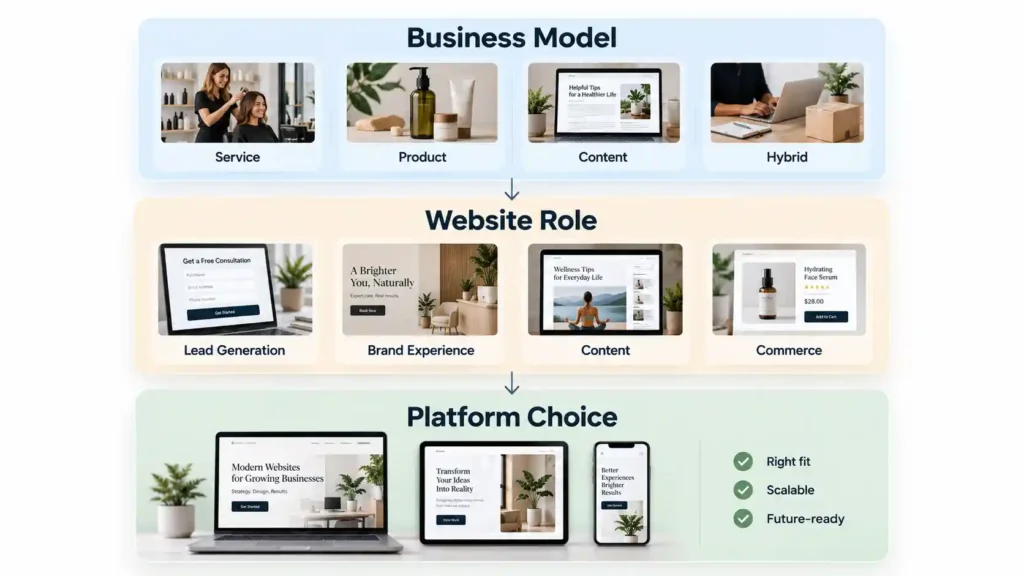
What does your business need the website to do?
If your website is mainly responsible for generating leads, explaining services, building credibility, publishing content, and presenting a strong brand, you are solving a website and marketing problem.
If your website is responsible for managing products, orders, payments, inventory, checkout, and multiple sales channels, you are solving a commerce problem.
Some businesses have both.
That is where the decision requires more thought.
Webflow and Shopify solve different core problems
Webflow’s platform combines visual development, CMS capabilities, hosting, content management, SEO-related controls, and other website-management tools. Its Ecommerce offering adds products, orders, carts, checkout, and related store functionality.
Shopify describes itself as a complete commerce platform, with tools for online and in-person selling, products, inventory, payments, sales channels, checkout, and broader commerce operations.
This creates an important distinction.
Webflow can support ecommerce. Shopify can support sophisticated website experiences.
But their centers of gravity are different.
Choose Webflow when the website experience is central
Webflow can make sense when the website itself plays a major role in communicating value.
For example:
Professional services
A law firm, consultant, financial company, architect, or specialist service provider may need strong service pages, thought leadership, team information, case studies, and lead generation.
Creative businesses
A design studio or creative professional may depend heavily on visual presentation.
B2B businesses
A B2B company may need product or service education, industry pages, resources, case studies, and lead-generation journeys.
Content-led businesses
A business publishing a significant amount of structured content may value a flexible CMS and visual content-management experience.
Webflow’s CMS is designed to let teams manage structured content visually and connect it to custom-designed layouts.
In these situations, Webflow deserves serious consideration.
Choose Shopify when commerce operations are central
Shopify becomes more attractive when selling products is the primary business activity.
Consider a business that needs:
- Product catalogs
- Variants
- Inventory
- Checkout
- Payments
- Shipping
- Discounts
- Order management
- Multiple sales channels
- In-person selling
- App integrations
Shopify’s platform is specifically designed around these commerce requirements.
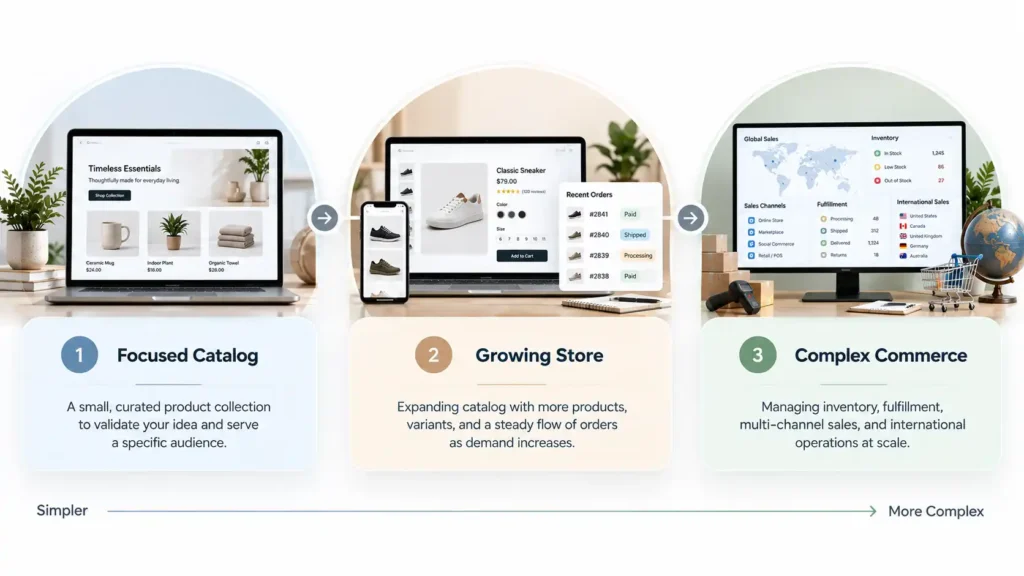
The distinction matters because ecommerce becomes complicated surprisingly quickly.
A store with 10 products and a store with 2,000 products do not have the same platform requirements.
Design flexibility is not the same as business flexibility
This is a useful distinction.
A platform can give you enormous design control without necessarily being the best operational platform for your business.
Likewise, a platform can give you excellent commerce infrastructure without being the ideal environment for a highly editorial brand experience.
So when comparing Webflow and Shopify, separate these questions:
How much control do I want over the design?
and:
How much operational complexity does my business need the platform to handle?
Those are different questions.
A service business and a product business should not start from the same platform decision
Imagine two companies.
Business A: A marketing consultant
The website needs:
- Services
- About page
- Case studies
- Blog
- Resources
- Lead magnet
- Contact form
- Booking
There is no major product catalog.
For this business, I would probably investigate Webflow before Shopify.
Business B: A fashion retailer
The website needs:
- Hundreds of products
- Variants
- Inventory
- Promotions
- Checkout
- Shipping
- Returns
- Customer accounts
- Sales channels
For this business, I would start the evaluation with Shopify.
The difference is not that one business “needs a better website.”
Both do.
The difference is what the website needs to accomplish operationally.
What about ecommerce on Webflow?
Webflow is not simply a marketing-site-only platform.
Its Ecommerce tools support products and categories, orders, payments, shipping, inventory-related functions, subscriptions, discounts, cart, checkout, and integrations.
That makes it viable for certain ecommerce businesses.
The question is whether those capabilities fit the store’s complexity and growth requirements.
For a design-led brand with a relatively focused catalog, Webflow can be interesting.
For a commerce-heavy operation with extensive operational requirements, Shopify may be the more natural starting point.
The distinction is about fit, not capability alone.
What about Shopify for a nontraditional website?
Shopify is also more flexible than some comparisons suggest.
Its online store supports custom menus, responsive themes, custom domains, blog content, accelerated checkout, and developer tools. Shopify also supports custom storefronts and headless approaches.
So a business should not assume:
“Shopify means I have to use a basic template.”
That is not accurate.
The real question is how much customization you need and whether the commerce-first foundation remains appropriate for the business.
SEO should not be the deciding factor by itself
You will often hear platform comparisons framed around SEO.
That can become misleading.
SEO success depends on far more than the platform name.
It depends on:
- Content quality
- Search intent
- Site architecture
- Technical implementation
- Internal linking
- Page quality
- Metadata
- Performance
- Structured information
- User experience
- Authority and relevance
Both platforms provide ways to build and optimize websites.
Webflow provides visual SEO and CMS capabilities, while Shopify provides customizable storefronts, content functionality, and developer options.
I would therefore avoid choosing either platform based on a simplistic statement such as “Google prefers this platform.”
Focus on the actual requirements.
Think about who will manage the website
This question gets overlooked.
Who will update products?
Who will publish blog posts?
Who will add landing pages?
Who will manage inventory?
Who will maintain integrations?
Who will handle design changes?
Who will troubleshoot problems?
A platform should be evaluated not only by what it can do, but also by how practical it is for the people responsible for it.
That can be especially important for small businesses without an internal technical team.
Think about your growth model
A business does not need to predict the future perfectly.
It does need to understand the direction it is moving.
If you are launching a service business and may eventually sell a few digital products, there is little reason to build a highly complex commerce environment on day one.
If you are launching a product brand and already expect ecommerce to be central, it makes more sense to establish the right commerce foundation early.
The question is:
What is the most realistic next stage of the business?
Not:
What could theoretically happen someday?
A better comparison framework
Instead of asking which platform has the longest feature list, score both against these areas:
| Decision factor | If this matters most | Platform to investigate first |
| Brand presentation | Custom website experience | Webflow |
| Content | Structured, design-led content | Webflow |
| Lead generation | Marketing website | Webflow |
| Product operations | Ecommerce infrastructure | Shopify |
| Large catalog | Catalog and inventory management | Shopify |
| Multichannel selling | Commerce expansion | Shopify |
| Physical retail | Online + offline commerce | Shopify |
| Highly custom marketing site | Design control | Webflow |
| Hybrid needs | Depends on architecture | Evaluate both |
This is a much better starting point than “Which platform is better?”
What about cost?
Both platforms have multiple plans and the actual cost depends on the business setup.
Webflow’s current Ecommerce pricing lists Standard at $29/month billed yearly, with Plus at $74 and Advanced at $212. Shopify currently lists Basic at $29/month when billed yearly, with higher plans for growing businesses.
Those numbers are useful for initial planning, but they should not be treated as the full cost of ownership.
A realistic comparison should also consider:
- Design and development
- Apps
- Integrations
- Payment costs
- Maintenance
- Migration
- Third-party services
- Staff time
- Operational complexity
The cheapest subscription can become the more expensive decision if it creates unnecessary work.
A simple decision tree
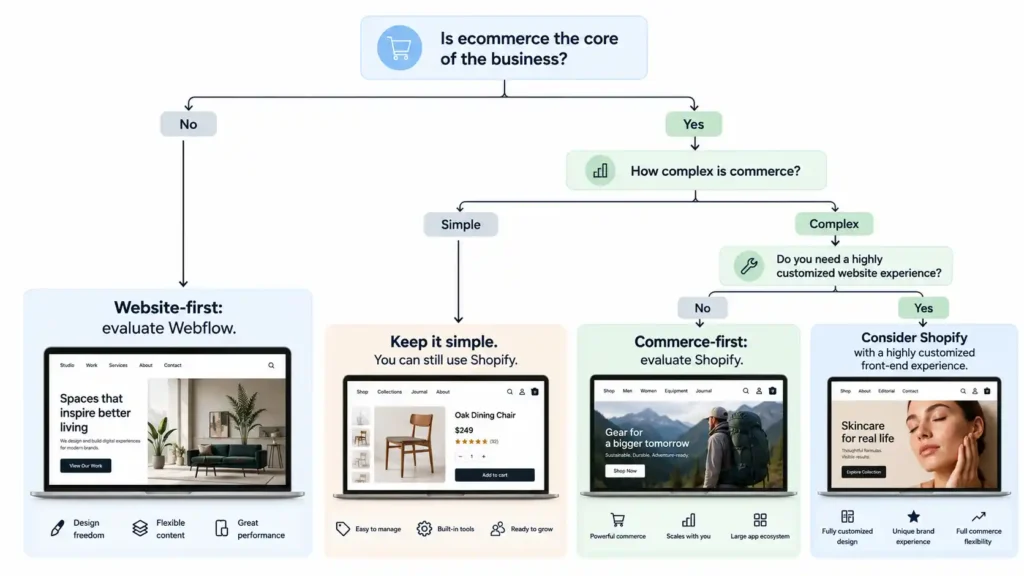
If you want to simplify the entire comparison, start here.
Is ecommerce the core of the business?
If no, investigate Webflow first if design, content, and lead generation are important.
If yes, continue.
Is the store operationally complex?
If yes, investigate Shopify first.
If no, compare both based on design requirements, product structure, content needs, and long-term plans.
Then ask:
Will the website experience itself be a major competitive advantage?
If yes, give Webflow serious consideration.
If commerce operations are the dominant concern, Shopify may remain the better fit.
When a platform becomes a business decision
At some point, this stops being a web design question.
It becomes an operations question.
Changing platforms later can involve:
- Migration work
- URL changes
- Content migration
- Product migration
- Redirects
- Design redevelopment
- Integrations
- Analytics
- SEO considerations
- Staff training
That is why choosing based on the business model upfront can save unnecessary disruption later.
You do not need to predict every future requirement.
You simply want to avoid selecting a platform that is obviously misaligned with the way the business works.
There is no universal Webflow winner.
There is no universal Shopify winner.
There is only the platform that makes more sense for a particular business model.
Choose Webflow when your website is primarily a brand, content, marketing, or lead-generation experience and visual control matters.
Choose Shopify when your website is primarily a commerce operation and products, orders, inventory, checkout, and sales channels are central.
And if your business sits somewhere between those two, slow the decision down.
List what the business actually needs.
Separate must-haves from nice-to-haves.
Think about who will manage the platform.
Then choose the system that supports the business rather than forcing the business to adapt to the platform.