

A website form can look like a simple part of your website: someone enters their name, phone number, email, and message, then clicks submit. But behind that button is usually a much larger workflow. The submission may trigger an email notification, create a CRM record, alert a salesperson, start an automation, send an SMS, or become part of the process your team uses to decide which enquiries need attention first.
That is why form spam is more than an annoying collection of fake messages.
For a roofing company, plumber, electrician, HVAC contractor, landscaper, pest control company, cleaning business, remodeler, or another home service provider, repeated unwanted submissions can introduce noise into a workflow that depends on accurate information. The problem becomes more important when the website is connected to other systems, because one poor submission can potentially travel further than the form itself.
The goal is not to make every form difficult to use. It is to make the submission process more trustworthy while keeping the experience reasonable for genuine customers.
Form spam is a workflow problem, not just a website problem
It is tempting to think of spam as something your website administrator can simply delete later. That view misses what happens between the moment someone submits a form and the moment your team sees the result.
Imagine a homeowner visits an electrical contractor’s website and submits a request for service. The website sends the enquiry to the company’s inbox, the form creates a lead inside a CRM, and an automation sends an acknowledgement to the person who submitted it.
Now imagine that the same form receives dozens of automated submissions.
The inbox becomes harder to scan. The CRM may contain records that do not represent genuine prospects. Automated notifications can become distracting. If follow-up tasks are created automatically, your team may spend time reviewing records that never had a realistic chance of becoming a customer.
The exact effect depends on how your website and connected systems are configured, but the principle is simple: the more systems connected to a form, the more important submission quality becomes.
This is why form protection belongs in a broader website workflow discussion. You are not only protecting a form field. You are protecting the processes that begin after the form is submitted.
Where form spam can create operational friction
The impact is usually easier to understand when you follow the submission through the business.
1. It can make genuine enquiries harder to identify
Suppose a home service company receives enquiries through a website form, phone calls, and other channels. If the website starts generating a stream of irrelevant submissions, the team has more information to sort through before finding the messages that actually require attention.
That does not necessarily mean a genuine lead will be missed every time. It means the process becomes noisier, and someone has to spend additional time separating useful information from unwanted submissions.
For a business where speed matters, even small amounts of unnecessary administrative work can become frustrating when they happen repeatedly.
2. It can pollute connected CRM data
A form may be connected directly to a CRM or another lead-management system. If every submission automatically creates a contact or lead record, spam submissions can enter that system too.
The result may be duplicate-looking records, incomplete contact information, meaningless messages, or records that require manual review.
The important question is not simply, “Can my form block spam?”
A better question is:
“What happens in my business every time someone submits this form?”
That question reveals where the real risk exists.
3. It can trigger unnecessary automations
Many modern websites do more than send an email after submission.
A form may trigger:
- A confirmation email
- A CRM record
- A lead notification
- An internal task
- An SMS notification
- An email sequence
- A webhook or third-party integration
- A booking or qualification workflow
If spam reaches the workflow before it is filtered, some of those actions may happen unnecessarily.
The exact behavior depends on your setup, so this is something worth testing rather than assuming. Review what happens from the moment the form is submitted to the moment your team acts on the information.
4. It can consume attention even when it does not create technical damage
Not every form spam problem produces a dramatic technical failure.
Sometimes the biggest cost is simply attention.
Someone has to open the message, recognize that it is irrelevant, delete it, check whether it entered the CRM, and move on. One message may not matter. Repeated submissions create a different experience.
This is especially relevant when several people are responsible for responding to enquiries. A cleaner lead flow can make the work easier to manage because the team spends more time reviewing genuine customer conversations and less time sorting noise.
Not every unwanted submission is actually bot spam
This distinction is important.
A submission can be unwanted without being automated.
For example, you may receive:
- A genuine person entering the wrong service
- A customer submitting incomplete information
- A salesperson using your contact form for outreach
- Someone looking for a service you do not provide
- A person submitting the form multiple times because they did not see a confirmation
- An automated bot submitting meaningless content
These situations require different responses.
If you treat every poor-quality enquiry as a technical security problem, you may add unnecessary friction to the form. On the other hand, if clearly automated activity is being treated as normal customer traffic, the underlying problem can continue.
The first step is therefore diagnosis.
Look at what is actually arriving.
A useful way to diagnose the problem
Before adding another security tool, review several recent submissions and look for patterns.
Ask:
- Are the names obviously fabricated or repetitive?
- Are the messages unrelated to the service?
- Are submissions arriving unusually quickly or repeatedly?
- Are multiple submissions using similar wording?
- Are they coming through the same form or endpoint?
- Does the activity appear connected to a specific period or pattern?
- Does your form create CRM records or automations before the submission is reviewed?
The answers can tell you whether you are dealing primarily with spam, poor form qualification, repeated legitimate submissions, or a combination.
That distinction matters because the solution should match the problem.
The form itself can influence lead quality
Spam protection gets most of the attention, but form design also matters.
A form asking for only a name and email may be easy to complete, but it may give your team very little context about the enquiry. A long form asking for every possible detail may collect more information but create unnecessary friction for genuine customers.
For a home service business, the right balance depends on the service and the sales process.
A roofing company might reasonably ask about the type of project, property location, and a short description of the work. An electrician might need the service type and a brief explanation of the issue. A remodeling company may want to understand the project scope before scheduling a conversation.
The objective is not to make the form longer simply because spam exists.
It is to collect the information that helps the business understand the enquiry while keeping the path to contact straightforward.
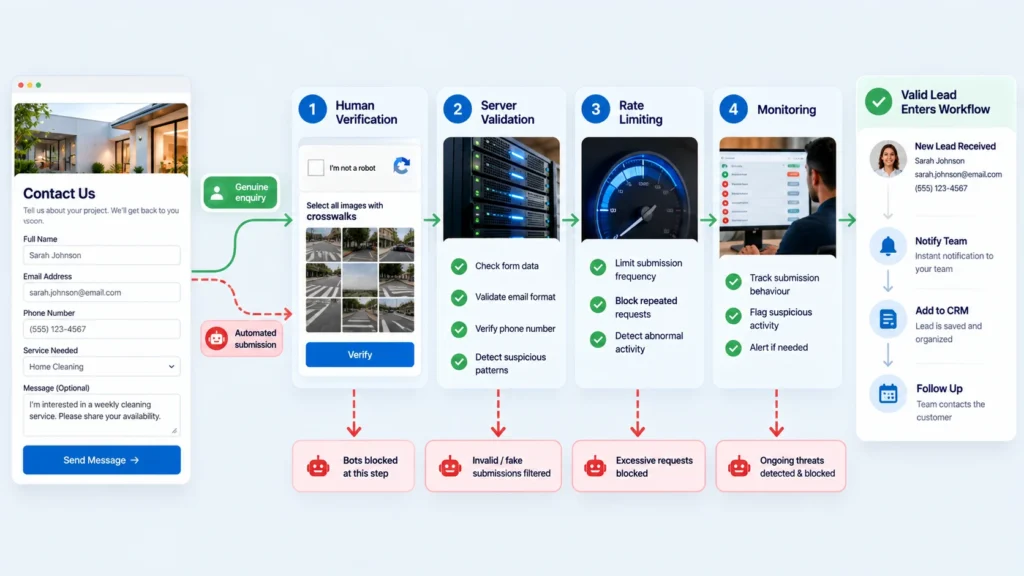
Think in layers instead of looking for one magic filter
There is rarely a single setting that solves every form-abuse scenario.
Cloudflare’s current guidance describes form protection as a combination of measures such as verifying that visitors are human, limiting repeated submissions, and blocking known attack patterns.
That layered approach makes sense for business websites because different protections address different types of behavior.
Layer 1: Human verification
A service such as Cloudflare Turnstile can be added to a form to help distinguish human visitors from automated submissions. Cloudflare describes Turnstile as a CAPTCHA alternative that can be embedded into websites and used with forms.
The important implementation detail is that the browser-side widget is not the entire security mechanism. Cloudflare requires server-side token validation through its Siteverify API before the submission is processed.
That means simply placing a verification widget on the page is not enough if the underlying implementation does not actually validate the token on the server.
Layer 2: Rate limiting
Human verification and rate limiting solve different problems.
Cloudflare explains that rate limiting can help control excessive requests to an endpoint, while Turnstile operates at the form level. It also notes that rate limiting can help catch high-volume requests that bypass the client-side form altogether.
This matters because a form endpoint can potentially receive requests without someone interacting with the visible page in the normal way.
Layer 3: Monitoring and review
Protection should not be installed and forgotten.
Cloudflare’s documentation recommends monitoring usage and unusual patterns when implementing Turnstile.
For a business owner, the practical lesson is straightforward: check whether the protection is reducing the unwanted activity without creating problems for genuine customers.
What a sensible workflow can look like
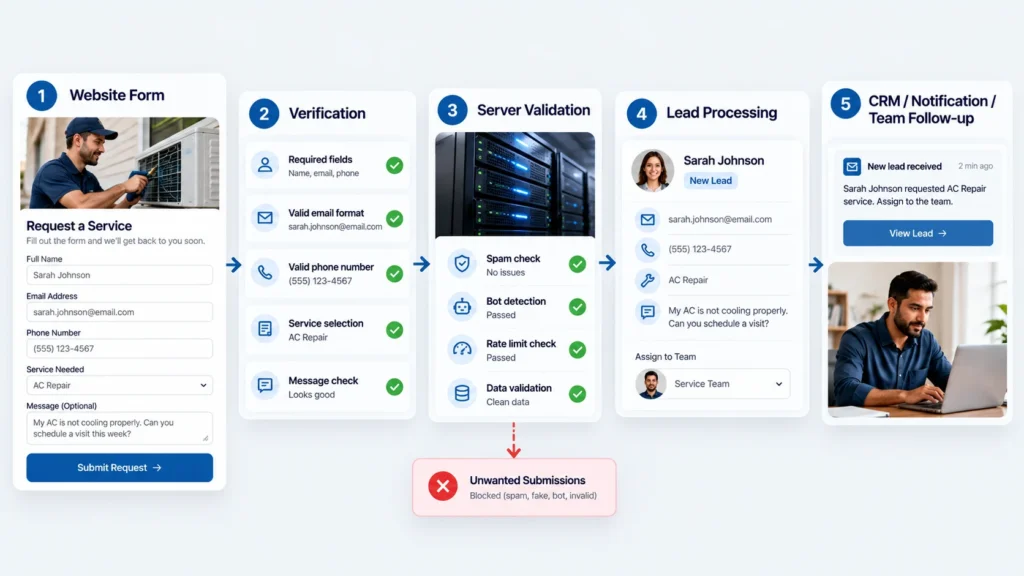
For many home service websites, a sensible form workflow can be thought of like this:
Visitor → Form → Verification → Server-side validation → Spam/risk checks → Lead processing → CRM/notification → Human follow-up
The exact architecture will vary.
A simpler website may only send a notification email after validation. A more advanced setup may send validated submissions into a CRM, assign them to a team member, and trigger an acknowledgement.
The important part is deciding where validation happens before downstream actions begin.
That is a workflow decision, not simply a design decision.
Do not make the form harder than the problem requires
There is another side to form protection that deserves attention: customer experience.
If a genuine homeowner wants to request an estimate and encounters a confusing or frustrating verification process, the protection itself can become part of the problem.
The right approach depends on the amount and type of abuse you are experiencing. A low-volume problem may need a simpler intervention than a form endpoint receiving persistent automated traffic.
Cloudflare’s Turnstile documentation describes multiple widget configurations and notes that managed behavior can adapt the challenge experience based on visitor risk.
That does not mean every business should immediately add Turnstile to every form.
It means the implementation should be based on the actual situation.
Audit the entire lead journey, not just the form
One of the most useful exercises is to submit your own form and follow the submission through the system.
Check what happens.
Does the form:
- Send an email?
- Create a CRM record?
- Trigger an automation?
- Notify multiple employees?
- Send an SMS?
- Create a task?
- Add someone to a marketing list?
- Send data to another application?
Then test what happens when a submission fails verification.
Does the system correctly reject it before those downstream actions happen?
This is where technical implementation becomes important. Cloudflare specifically states that server-side validation is mandatory for Turnstile and that the client-side widget alone does not protect the form.
For a business owner, you do not necessarily need to understand the code behind that process. But you should understand the workflow and know where validation occurs.
A practical checklist for home service websites
If you are reviewing a website form today, work through this checklist:
Form
- Does the form collect enough information to understand the enquiry?
- Is every field genuinely necessary?
- Is the form easy for a real customer to complete?
Spam protection
- Is there evidence of automated submissions?
- Is human verification appropriate for the situation?
- Is the verification actually validated server-side?
Traffic control
- Could repeated requests overwhelm the form endpoint?
- Would rate limiting be appropriate for the site’s setup?
Lead management
- Does every submission automatically create a CRM record?
- Could spam create unnecessary tasks or notifications?
- Can your team quickly identify genuine enquiries?
Testing
- Have you tested a normal successful submission?
- Have you tested an invalid or rejected submission?
- Have you checked what happens in the CRM and notification systems afterward?
Monitoring
- Are you reviewing unusual submission patterns?
- Has spam protection created any problems for genuine visitors?
This checklist is more useful than simply asking whether a website has a CAPTCHA.
The bigger question is whether the entire submission workflow behaves properly.
When should you actually fix it?
If you are receiving occasional irrelevant submissions and they have no meaningful effect on your workflow, the issue may not justify a complicated technical setup.
If spam is repeatedly filling inboxes, creating unwanted CRM records, triggering unnecessary notifications, or making it harder for your team to identify genuine enquiries, it is worth investigating the form workflow more seriously.
And if the problem involves repeated automated requests against the form endpoint, look beyond the visible form itself. Cloudflare’s current guidance specifically distinguishes form-level protection from rate limiting because automated traffic can interact with endpoints in different ways.
The solution should therefore be proportional to the problem.
The real goal is a cleaner path from enquiry to action
Form spam is easy to dismiss because each individual submission can look insignificant. But a website form is often the first step in a chain that involves people, software, notifications, databases, and follow-up.
When unwanted submissions enter that chain repeatedly, the problem becomes operational.
The answer is not to make every website form complicated or to add every available security feature. Start by understanding what is happening, where the unwanted activity enters, and what happens after submission. Then add the level of protection that makes sense for the actual risk.
A well-designed form should do two things at the same time: remain easy enough for genuine customers to use and reliable enough that your business can trust what happens after someone clicks Submit.
If you are reviewing a home service website and are not sure whether the problem is the form itself, the spam protection, or the workflow connected to it, that distinction is worth resolving before changing the website. A technical review of the complete submission path can often reveal where the real issue sits.