

A business website can collect a surprising amount of information without anyone intentionally deciding to build a complicated tracking system.
A form plugin adds a script. An analytics platform gets installed. A marketing tool is connected. A heatmap is added. Someone enables another integration because “we might need the data later.”
Six months later, the website has a collection of tracking technologies that nobody has properly reviewed.
The problem is not analytics.
The problem is analytics without a clear strategy.
For a business, the better approach is to decide what you need to measure, what data you are comfortable collecting, and how that fits your privacy approach before adding more tracking.
What Analytics Should Actually Do for a Business
Analytics should help answer business questions.
For a service business, those questions might include:
- Which pages attract potential customers?
- Where are visitors coming from?
- Which service pages receive attention?
- Do visitors reach important conversion points?
- Which content deserves more investment?
- Where might the website experience be losing potential leads?
For ecommerce, the questions may be different:
- Which product categories attract demand?
- Where do shoppers abandon the purchase journey?
- Which traffic sources produce valuable customers?
- Which landing pages perform well?
- Which campaigns bring qualified traffic?
The point is that measurement requirements come from the business model.
You do not need to collect every available data point simply because your analytics platform offers it.
Your Analytics Stack Has a Privacy Footprint
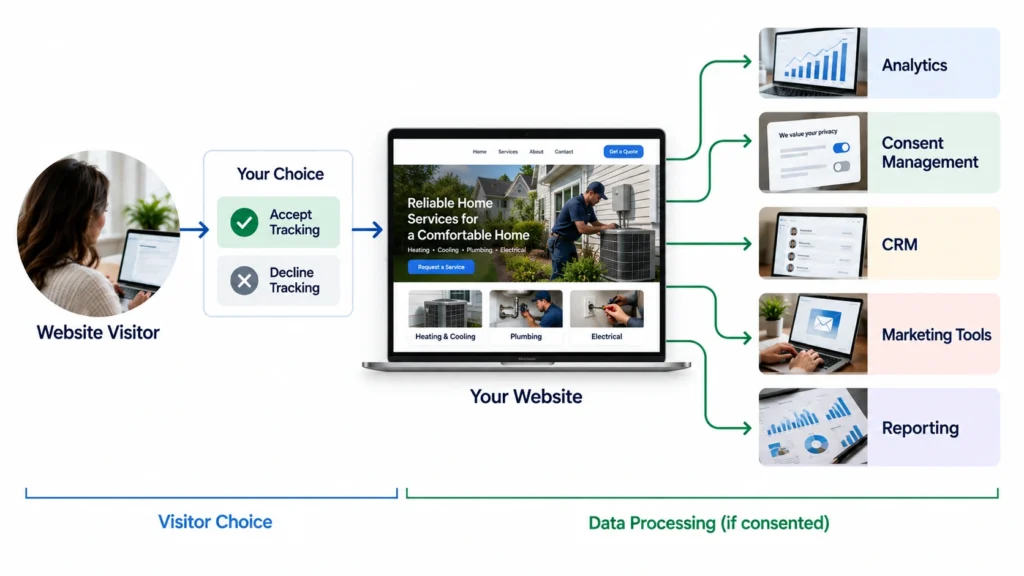
Every tracking technology introduces some form of data consideration.
That may include cookies, scripts, identifiers, third-party processing, data transfers, retention, integrations, or access permissions.
The UK’s ICO now describes a broad category of “storage and access technologies” that includes cookies, tracking pixels, link decoration, web storage, fingerprinting, scripts, and tags. Its current guidance was finalized in April 2026.
That is useful for a practical reason.
When you audit a website, do not look only for something called a “cookie.”
Look at the broader tracking environment.
A website can have privacy implications even when the business owner is not thinking of the technology as traditional cookie tracking.
Build Analytics Around Your Privacy Position
There is no single analytics setup that is right for every business.
A business with a privacy-first approach may intentionally choose:
- Fewer tracking technologies
- Limited data collection
- Shorter retention periods
- Fewer third-party integrations
- Clear consent controls
- Restricted analytics access
- More aggregated reporting
Another business may legitimately need more sophisticated measurement.
The important thing is alignment.
Your analytics system should make sense alongside your privacy practices.
If your privacy policy says you take a restrained approach to data but your website quietly loads a large number of third-party tracking technologies, that deserves review.
Review the Data Before Reviewing the Dashboard
One practical mistake is spending too much time inside the analytics dashboard and not enough time understanding what the website is actually sending.
Before interpreting reports, review the data flow.
Ask:
What information is being collected?
Then ask:
Where does it go?
Then:
How long is it retained?
Then:
Who can access it?
And finally:
Why do we need it?
Google provides controls for data sharing, retention, deletion, access, and other privacy-related settings in Analytics.
Those controls do not replace a broader privacy strategy, but they are useful building blocks.
Consent Should Be Designed Into the Setup
Consent should not be an afterthought added after the analytics code has already been deployed.
If your jurisdiction and tracking setup require consent, the technical implementation should respect that choice.
The ICO’s guidance says non-essential storage and access technologies generally require valid consent, and its guidance specifically discusses analytics technologies and consent mechanisms.
Google’s consent-management documentation similarly describes a process of obtaining user consent, passing the choice to Google, and verifying that Google tags comply with that choice.
From a website implementation perspective, this means your developer, marketer, analytics specialist, and privacy process should not operate as four unrelated systems.
They need to work together.
Data Retention Is Part of the Architecture
A useful analytics setup is not simply about what you collect.
It is also about how long you keep it.
Google Analytics lets administrators configure retention periods for certain user-level and event-level data.
That creates an opportunity to ask whether your business really needs the maximum available retention period.
For some businesses, longer historical analysis may be useful.
For others, a shorter period may be sufficient.
The right answer depends on the business, the data, and the intended use.
The mistake is assuming that “more retention” is automatically better.
Don’t Confuse Privacy With Turning Analytics Off
There is a temptation to approach privacy as an all-or-nothing choice.
Either track everything or track nothing.
That is rarely the most useful way to think about it.
A business can still use analytics while becoming much more deliberate about what it collects.
For example, you may decide that you need:
- Traffic source information
- Important page performance
- Form conversion events
- Ecommerce events where relevant
- Basic content engagement
But you may decide that certain additional tracking is not worth the complexity.
That is not “anti-analytics.”
It is purpose-driven analytics.
A Simple Analytics Privacy Audit
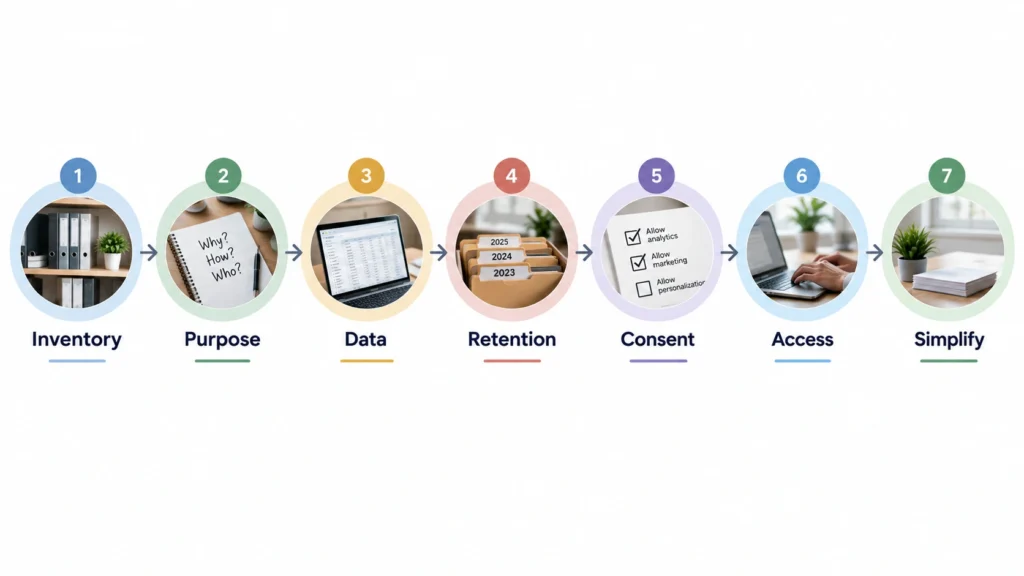
If you are responsible for a business website, I would use this process before adding another tracking tool.
Step 1: Inventory the technologies
Identify analytics scripts, pixels, tags, consent tools, marketing integrations, session-recording tools, and other tracking technologies.
Step 2: Map the purpose
For each technology, write down what business question it answers.
If nobody can explain the purpose, investigate it.
Step 3: Review data collection
Determine what information is being sent and whether all of it is genuinely necessary.
Step 4: Review retention
Check how long relevant data remains available and whether that period has a business reason.
Step 5: Review consent
Determine whether the technology requires consent in the jurisdictions relevant to your website visitors and whether the implementation actually honors the user’s choice.
Step 6: Review access
Make sure analytics access is limited to people who genuinely need it.
Step 7: Remove unnecessary complexity
If a tracking tool does not contribute enough value to justify its data and maintenance footprint, consider removing it.
The Business Case for a Simpler Setup
Privacy is often discussed as a compliance issue.
For businesses, I think there is also a strong operational argument.
A simpler analytics environment can be easier to:
- Understand
- Maintain
- Document
- Troubleshoot
- Explain to stakeholders
- Audit
- Connect with business decisions
The NIST Privacy Framework describes privacy risk management as a structured organizational activity and is designed to be flexible across organizations and technologies.
That principle fits small-business website strategy well.
You do not need a giant privacy program to start thinking systematically.
You need to know what your website is collecting and why.
What This Means for Your Website
If you are redesigning a website, migrating platforms, or adding analytics, privacy should be considered during the planning stage.
Not after launch.
A website project is an opportunity to review the whole measurement setup:
What should we measure?
What data do we actually need?
Which tools are necessary?
What should visitors be told?
How should consent work?
How long should relevant data remain available?
Those questions can prevent a surprisingly large amount of unnecessary tracking and technical complexity.
The Bottom Line
A good analytics setup should make the business smarter without making its data practices unnecessarily complicated.
Start with the business questions. Then define the minimum useful data. Then design the analytics architecture around those requirements and your privacy approach.
Do not install tracking first and try to justify it later.
If your current website has grown organically over several years, an analytics and tracking audit may be worthwhile. The goal is not to remove useful measurement. It is to make sure every important piece of tracking has a clear business purpose.